# Manuels d’utilisation

Manuels d'utilisation sur time2learn Young Talents

# Employé(e) de commerce

##### Pour formateurs:


- [Manuel d’utilisation Formation commerciale de base pour formateurs.pdf](https://docs.swisslearninghub.help/attachments/1573)
- [Aperçu des formateurs d’employés de commerce.pdf](https://docs.swisslearninghub.help/attachments/1568)
- [Guide rapide - Apprentissage du commerce dans.pdf](https://docs.swisslearninghub.help/attachments/1618)
- [Fiche d’information sur l’apprentissage raccourci.pdf](https://docs.swisslearninghub.help/attachments/1570)
- [Guide succinct – Transmission de notes vers la BDEFA2.pdf](https://docs.swisslearninghub.help/attachments/1571)
- [Echéances de coordination BDEFA2 FCB](https://docs.swisslearninghub.help/attachments/1575)
- [Informations pour ov-ap](https://docs.swisslearninghub.help/attachments/1574)

##### Pour personnes en formation:

- [Manuel d’utilisation Formation commerciale de base pour Personnes en formation.pdf](https://docs.swisslearninghub.help/attachments/1572)
- [Aperçu des apprentis employés de commerce.pdf](https://docs.swisslearninghub.help/attachments/1569)
- [Manuel d’utilisation de l’application mobile pour personnes en formation](https://docs.swisslearninghub.help/attachments/1576)

# Logisticien(ne)

##### Pour formateurs:

- [Manuel d’utilisation logisticien(ne)s pour formateurs.pdf](https://docs.swisslearninghub.help/attachments/1596)

##### Pour personnes en formation:

- [Manuel d’utilisation logisticien(ne)s pour personnes en formation.pdf](https://docs.swisslearninghub.help/attachments/1595)

# Commerce de détail

##### Pour formateurs:

- [Manuel d’utilisation Commerce du détail pour formateurs.pdf](https://docs.swisslearninghub.help/attachments/1598)
- [Aperçu des formateurs du commerce de détail.pdf](https://docs.swisslearninghub.help/attachments/1619)

##### Pour personnes en formation:

- [Manuel d’utilisation Commerce du détail pour personnes en formation.pdf$](https://docs.swisslearninghub.help/attachments/1597)
- [Aperçu des apprentis du commerce de détail.pdf](https://docs.swisslearninghub.help/attachments/1620)

# Toutes les autres professions

##### Pour formateurs:

- [Manuel d’utilisation pour les professions avec des fonctionnalités standard pour formateurs.pdf](https://docs.swisslearninghub.help/attachments/1604)
- [Aperçu des formateurs des professions standard.pdf](https://docs.swisslearninghub.help/attachments/1621)

##### Pour personnes en formation:

- [Manuel d’utilisation pour les professions avec des fonctionnalités standand pour personnes en formation.pdf](https://docs.swisslearninghub.help/attachments/1603)
- [Aperçu des apprentis des professions standard.pdf](https://docs.swisslearninghub.help/attachments/1622)

# Modules complémentaires

- [Manuel d’utilisation Organizer.pdf](https://docs.swisslearninghub.help/attachments/1602)
- [Manuel d’utilisation Module procédure de qualification.pdf](https://docs.swisslearninghub.help/attachments/1601)

# Mobile App

### 1. Cockpit

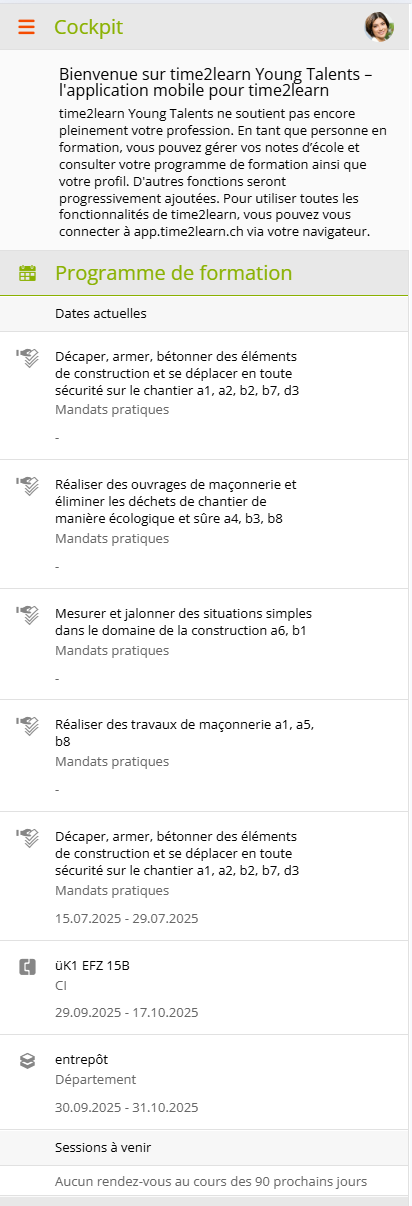
<table border="1" id="bkmrk-d%C3%A8s-que-l%27applicatio" style="border-collapse: collapse; width: 100%; border-width: 1px; background-color: rgb(255, 255, 255); border-color: rgb(255, 255, 255);"><colgroup><col style="width: 85.8875%;"></col><col style="width: 14.2208%;"></col></colgroup><tbody><tr><td style="border-color: rgb(255, 255, 255);">Dès que l'application est ouverte, le cockpit s'affiche automatiquement. Tu y trouveras tes rendez-vous actuels issus du programme de formation, des CIEs et les mandats pratiques.</td><td style="border-color: rgb(255, 255, 255);">![image.png](https://docs.swisslearninghub.help/uploads/images/gallery/2025-10/scaled-1680-/vSw9GEUJmmIO5dEX-image.png)</td></tr></tbody></table>

---

### 2. Notes école professionelle

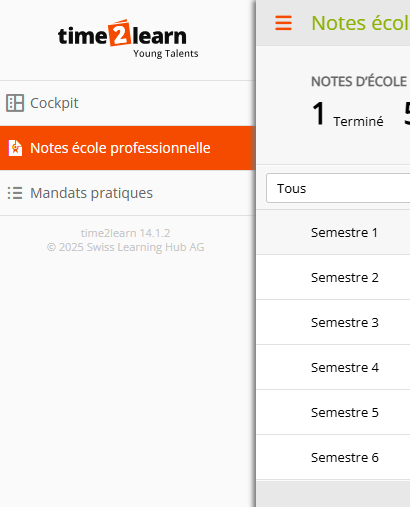
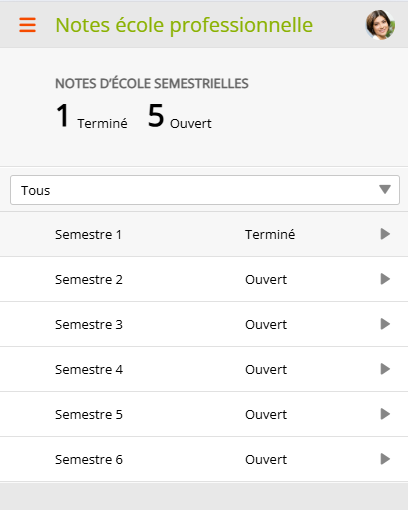
<table border="1" id="bkmrk-pour-acc%C3%A9der-%C3%A0-l%27ape" style="border-collapse: collapse; width: 100%; border-width: 1px; background-color: rgb(255, 255, 255); border-color: rgb(255, 255, 255);"><colgroup><col style="width: 75.6314%;"></col><col style="width: 11.8443%;"></col><col style="width: 12.5135%;"></col></colgroup><tbody><tr><td style="border-color: rgb(255, 255, 255);">Pour accéder à l'aperçu des notes scolaires, appuie sur ce symbole : ![image.png](https://docs.swisslearninghub.help/uploads/images/gallery/2025-10/scaled-1680-/6H7uhmDcQSw2QipO-image.png) dans le coin supérieur gauche ou balaye vers la droite.</td><td style="border-color: rgb(255, 255, 255);">![image.png](https://docs.swisslearninghub.help/uploads/images/gallery/2025-10/scaled-1680-/L4Rwb5FfRVFAW4o9-image.png)</td><td style="border-color: rgb(255, 255, 255);">[![image.png](https://docs.swisslearninghub.help/uploads/images/gallery/2025-10/scaled-1680-/5y3Xc7treiDrcx8Z-image.png)](https://docs.swisslearninghub.help/uploads/images/gallery/2025-10/5y3Xc7treiDrcx8Z-image.png)</td></tr></tbody></table>

---

#### 2.1 Traiter les matières et les pièces de jointes

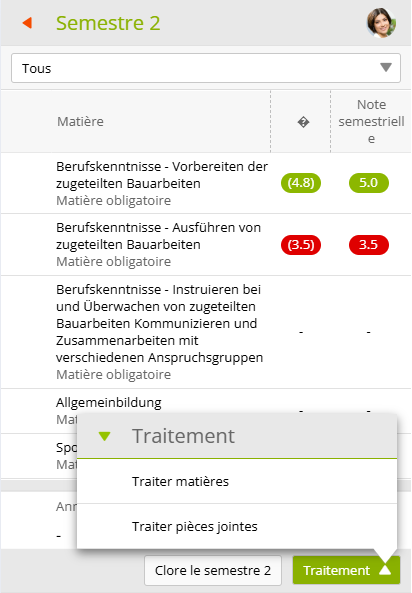
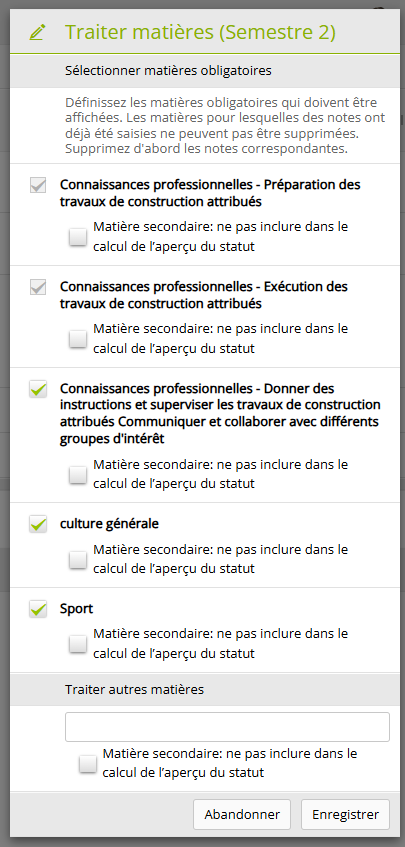
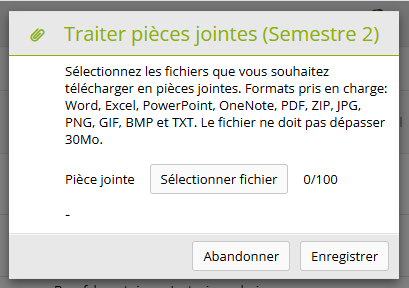
<table border="1" id="bkmrk-tu-peux-modifier-les-1" style="border-collapse: collapse; width: 100%; border-width: 1px; background-color: rgb(255, 255, 255); border-color: rgb(255, 255, 255);"><colgroup><col style="width: 74.3218%;"></col><col style="width: 12.0812%;"></col><col style="width: 13.5861%;"></col></colgroup><tbody><tr><td style="border-color: rgb(255, 255, 255);">Tu peux modifier les matières et les pièces de jointe de chaque semestre en cliquant sur **« Traitement »**. </td><td style="border-color: rgb(255, 255, 255);">  
</td><td style="border-color: rgb(255, 255, 255);">![image.png](https://docs.swisslearninghub.help/uploads/images/gallery/2025-10/scaled-1680-/cpJbUOIOpCqwIKEX-image.png)</td></tr><tr><td style="border-color: rgb(255, 255, 255);">Dans les annexes, tu peux par exemple joindre directement le contrôle photographié ou le bulletin scolaire.</td><td style="border-color: rgb(255, 255, 255);">![image.png](https://docs.swisslearninghub.help/uploads/images/gallery/2025-10/scaled-1680-/0ZshJat90w4YVvsy-image.png)</td><td style="border-color: rgb(255, 255, 255);">![image.png](https://docs.swisslearninghub.help/uploads/images/gallery/2025-10/scaled-1680-/3Zrw7uKK6vT2S6vh-image.png)</td></tr></tbody></table>

---

#### 2.2 Saisir les notes

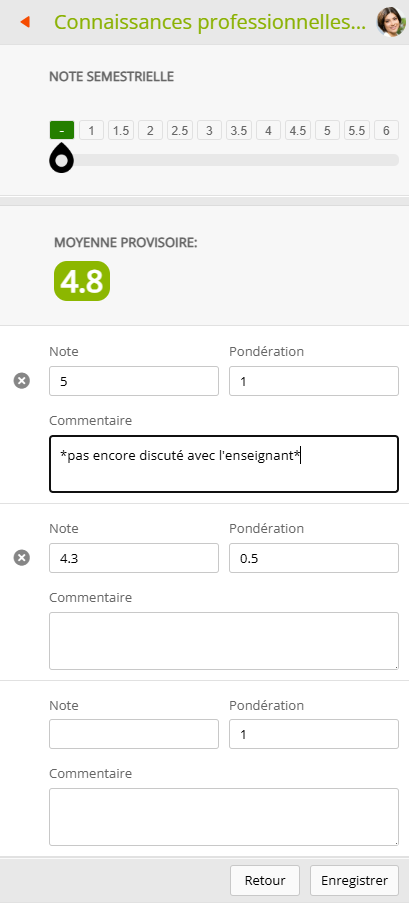
<table border="1" id="bkmrk-ici%2C-tu-peux-saisir-" style="border-collapse: collapse; width: 100%; border-width: 1px; background-color: rgb(255, 255, 255); border-color: rgb(255, 255, 255);"><colgroup><col style="width: 87.5542%;"></col><col style="width: 12.5542%;"></col></colgroup><tbody><tr><td style="border-color: rgb(255, 255, 255);">Ici, tu peux saisir tes notes et leur pondération par semestre en sélectionnant la matière. Tu peux également ajouter un commentaire à chaque note. La moyenne obtenue est calculée automatiquement et affichée en haut. Tu peux enfin définir la note semestrielle de la matière correspondante à l'aide du curseur.</td><td style="border-color: rgb(255, 255, 255);">[![image.png](https://docs.swisslearninghub.help/uploads/images/gallery/2026-02/scaled-1680-/a2LTfg1Xxu47ziTS-image.png)](https://docs.swisslearninghub.help/uploads/images/gallery/2026-02/a2LTfg1Xxu47ziTS-image.png)

</td></tr></tbody></table>

---

#### 2.3 Clore le semestre

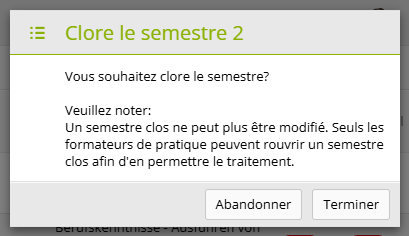
<table border="1" id="bkmrk-tu-peux-marquer-les-" style="border-collapse: collapse; width: 100%; border-width: 1px; background-color: rgb(255, 255, 255); border-color: rgb(255, 255, 255);"><colgroup><col style="width: 79.6088%;"></col><col style="width: 20.3804%;"></col></colgroup><tbody><tr><td style="border-color: rgb(255, 255, 255);">Tu peux marquer les semestres terminés comme tels en cliquant sur **« Clore le semestre x »** dans le semestre correspondant. </td><td style="border-color: rgb(255, 255, 255);">![image.png](https://docs.swisslearninghub.help/uploads/images/gallery/2025-10/scaled-1680-/Xeccg1gOJDTgdoWz-image.png)

![image.png](https://docs.swisslearninghub.help/uploads/images/gallery/2025-10/scaled-1680-/lguDFuqEaHV2Yi0F-image.png)

</td></tr></tbody></table>

<p class="callout danger">Les notes saisies au cours du semestre ne peuvent plus être modifiées après la fin de celui-ci.</p>

---

<span style="color: rgb(34, 34, 34); font-family: -apple-system, BlinkMacSystemFont, 'Segoe UI', Oxygen, Ubuntu, Roboto, Cantarell, 'Fira Sans', 'Droid Sans', 'Helvetica Neue', sans-serif; font-size: 18px; font-weight: 400;">2.4 Filtrer les matières</span>

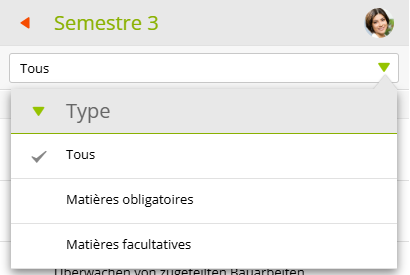
<table border="1" id="bkmrk-tu-peux-filtrer-les-" style="border-collapse: collapse; width: 100%; border-width: 1px; background-color: rgb(255, 255, 255); border-color: rgb(255, 255, 255);"><colgroup><col style="width: 82.197%;"></col><col style="width: 17.9113%;"></col></colgroup><tbody><tr><td style="border-color: rgb(255, 255, 255);">Tu peux filtrer les matières de chaque semestre ci-dessus en fonction des matières facultatives et obligatoires.</td><td style="border-color: rgb(255, 255, 255);">[![image.png](https://docs.swisslearninghub.help/uploads/images/gallery/2025-10/scaled-1680-/Ae276sX10dPjSpuD-image.png)](https://docs.swisslearninghub.help/uploads/images/gallery/2025-10/Ae276sX10dPjSpuD-image.png)</td></tr></tbody></table>

---

### 3. Mandats pratiques (pour les maçonnes et maçons)

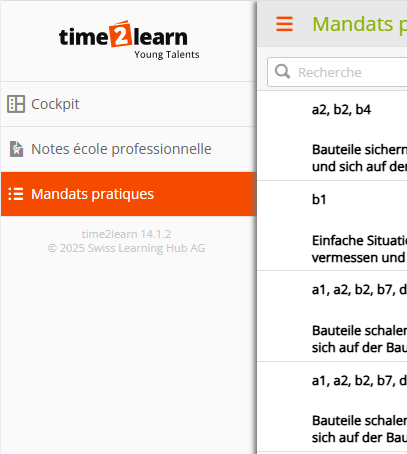
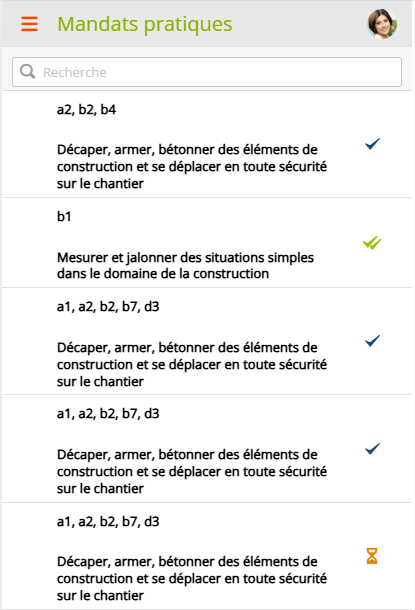
<table border="1" id="bkmrk-pour-acc%C3%A9der-%C3%A0-l%27ape-1" style="border-collapse: collapse; width: 100%; border-width: 1px; background-color: rgb(255, 255, 255); border-color: rgb(255, 255, 255);"><colgroup><col style="width: 75.6314%;"></col><col style="width: 11.6059%;"></col><col style="width: 12.7519%;"></col></colgroup><tbody><tr><td style="border-color: rgb(255, 255, 255);">Pour accéder à l'aperçu des mandats pratiques déjà commencées, appuie sur ce symbole : ![image.png](https://docs.swisslearninghub.help/uploads/images/gallery/2025-10/scaled-1680-/6H7uhmDcQSw2QipO-image.png) dans le coin supérieur gauche ou balaye vers la droite.</td><td style="border-color: rgb(255, 255, 255);">![image.png](https://docs.swisslearninghub.help/uploads/images/gallery/2025-10/scaled-1680-/anPnqqGBvIcaRiB3-image.png)</td><td style="border-color: rgb(255, 255, 255);">![image.png](https://docs.swisslearninghub.help/uploads/images/gallery/2025-10/scaled-1680-/84kU8bstXn2pprSY-image.png)</td></tr></tbody></table>

---

#### 3.1 Status du mandat pratique

<table border="1" id="bkmrk-zeichen-bedeutung-vo" style="border-collapse: collapse; width: 36.1905%; height: 308px;"><colgroup><col style="width: 47.8468%;"></col><col style="width: 52.1261%;"></col></colgroup><thead><tr style="height: 29.7017px;"><td style="height: 29.7017px;">signe</td><td style="height: 29.7017px;">signification </td></tr></thead><tbody><tr style="height: 52.8977px;"><td style="height: 52.8977px;">![image.png](https://docs.swisslearninghub.help/uploads/images/gallery/2025-10/scaled-1680-/yIS0sGrdvFnLjY6n-image.png)

</td><td class="align-left" style="height: 52.8977px;">Préparation</td></tr><tr style="height: 55.9233px;"><td style="height: 55.9233px;">![image.png](https://docs.swisslearninghub.help/uploads/images/gallery/2025-10/scaled-1680-/rhSrnBdVHfdd2jPF-image.png)

</td><td style="height: 55.9233px;">En cours</td></tr><tr style="height: 53.9205px;"><td style="height: 53.9205px;">![image.png](https://docs.swisslearninghub.help/uploads/images/gallery/2025-10/scaled-1680-/ZD261Xxi2LDP3Ksn-image.png)

</td><td style="height: 53.9205px;">Soumis</td></tr><tr style="height: 54.929px;"><td style="height: 54.929px;">![image.png](https://docs.swisslearninghub.help/uploads/images/gallery/2025-10/scaled-1680-/KawWVlZVVp43vwOP-image.png)

</td><td style="height: 54.929px;">Réédition</td></tr><tr style="height: 59.929px;"><td style="height: 59.929px;">![image.png](https://docs.swisslearninghub.help/uploads/images/gallery/2025-10/scaled-1680-/pm7QR0adPfApvcmK-image.png)

</td><td style="height: 59.929px;">Terminé</td></tr></tbody></table>

---


#### 3.2 Recherche de mandats pratiques 

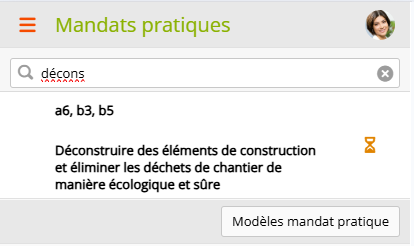
<table border="1" id="bkmrk-en-haut-dans-la-barr" style="border-collapse: collapse; width: 100%; border-width: 1px; background-color: rgb(255, 255, 255); border-color: rgb(255, 255, 255);"><colgroup><col style="width: 82.5733%;"></col><col style="width: 17.4159%;"></col></colgroup><tbody><tr><td style="border-color: rgb(255, 255, 255);">En haut dans la barre de recherche, tu peux rechercher des mandats pratiques spécifiques.</td><td style="border-color: rgb(255, 255, 255);">![image.png](https://docs.swisslearninghub.help/uploads/images/gallery/2025-10/scaled-1680-/qVY2iMvVlzbe2LIa-image.png)</td></tr></tbody></table>

---

#### 3.3 Ajout de mandats pratiques supplémentaires à traiter.

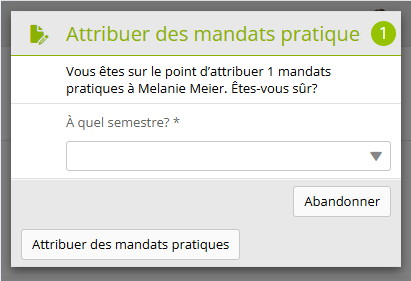
<table border="1" id="bkmrk-dans-ton-apprentissa" style="border-collapse: collapse; width: 100%; border-width: 1px; background-color: rgb(255, 255, 255); border-color: rgb(255, 255, 255);"><colgroup><col style="width: 83.3032%;"></col><col style="width: 16.686%;"></col></colgroup><tbody><tr><td style="border-color: rgb(255, 255, 255);">Dans ton apprentissage, tu dois avoir terminé tous les modèles des mandats pratiques. Tu peux donc également démarrer ici des mandats pratiques non encore commencées à l'aide des modèles des mandats pratiques, en les ajoutant au semestre correspondant à l'aide du bouton **« Modèles mandat pratique »** et **« Attribuer mandat pratique ».** </td><td style="border-color: rgb(255, 255, 255);">![image.png](https://docs.swisslearninghub.help/uploads/images/gallery/2025-10/scaled-1680-/IeAQSFIf6CYKDWbd-image.png)

![image.png](https://docs.swisslearninghub.help/uploads/images/gallery/2025-10/scaled-1680-/RORD9dNcIj1kquFb-image.png)

![ZGl9hu0OgRMOqWSq-image.png](https://docs.swisslearninghub.help/uploads/images/gallery/2025-10/scaled-1680-/eGVAFrESqUNVHgPA-zgl9hu0ogrmoqwsq-image.png)

</td></tr></tbody></table>

---

#### 3.4 Traitement d'un mandat pratique

Si tu souhaites traiter une tâche pratique, il te suffit de cliquer dessus.

##### Attribution

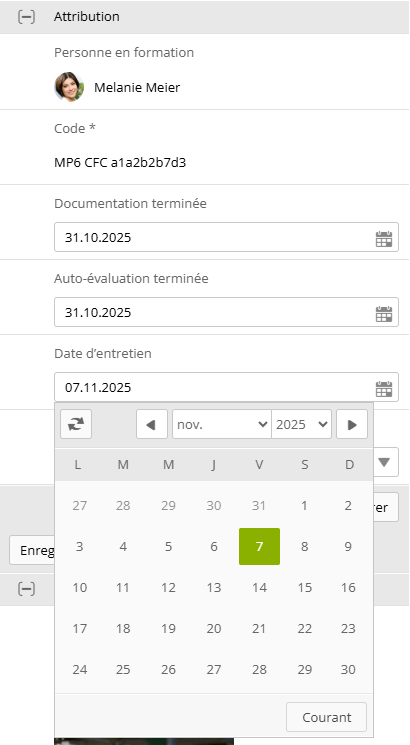
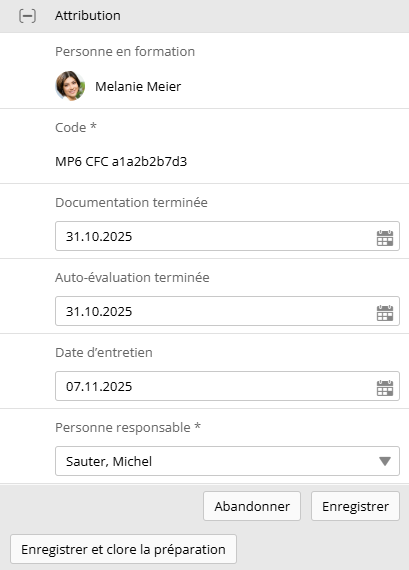
<table border="1" id="bkmrk-tu-peux-ensuite-d%C3%A9fi" style="border-collapse: collapse; width: 100%; border-width: 1px; background-color: rgb(255, 255, 255); border-color: rgb(255, 255, 255);"><colgroup><col style="width: 76.1075%;"></col><col style="width: 12.0831%;"></col><col style="width: 11.7985%;"></col></colgroup><tbody><tr><td style="border-color: rgb(255, 255, 255);">Tu peux ensuite définir les dates auxquelles tu souhaites, par exemple, terminer la documentation et l'Auto-évaluation, à quelle date la réunion doit avoir lieu et qui doit en être responsable. Tu peux enregistrer ces informations en cliquant sur **« Enregistrer ».** </td><td style="border-color: rgb(255, 255, 255);">![image.png](https://docs.swisslearninghub.help/uploads/images/gallery/2025-10/scaled-1680-/8IMX5YRVkoEqGjdO-image.png)</td><td style="border-color: rgb(255, 255, 255);">![image.png](https://docs.swisslearninghub.help/uploads/images/gallery/2025-10/scaled-1680-/JyIXmSg9Um254F1j-image.png)</td></tr></tbody></table>

<p class="callout danger">Lorsque tu cliques sur **« Enregistrer et clore la préparation »**, le statut de la commande passe de « Préparation » à « En cours » et les informations ne peuvent plus être modifiées. </p>

##### Documentation

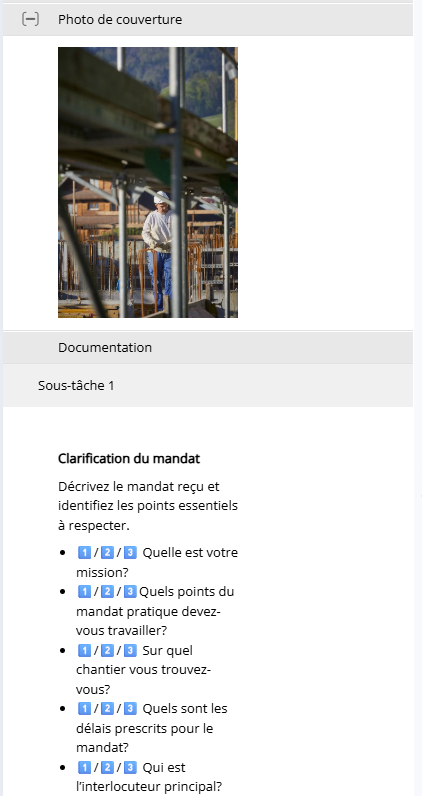
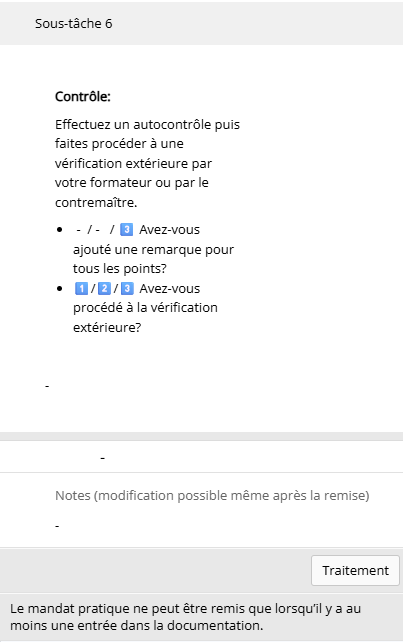
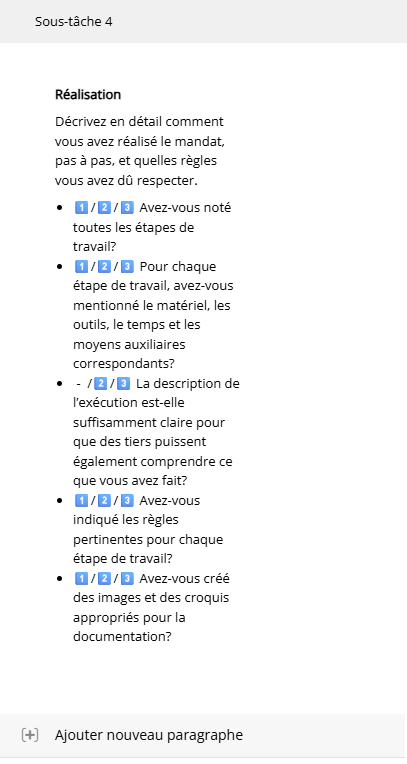
<table border="1" id="bkmrk-dans-la-section-%C2%AB-do" style="border-collapse: collapse; width: 100%; border-width: 1px; background-color: rgb(255, 255, 255); border-color: rgb(255, 255, 255);"><colgroup><col style="width: 76.5837%;"></col><col style="width: 11.4878%;"></col><col style="width: 11.9177%;"></col></colgroup><tbody><tr><td style="border-color: rgb(255, 255, 255);">Dans la section « Documentation », chaque mission pratique est élaborée et exécutée en 6 étapes (Sous-tâches) : clarification du mandat, planification et AVOR, prise de décision, réalisation, réflexion et contrôle. Tu peux les modifier en cliquant sur le bouton **« Modifier »**.</td><td style="border-color: rgb(255, 255, 255);">![image.png](https://docs.swisslearninghub.help/uploads/images/gallery/2025-10/scaled-1680-/rUAjYABmF2TL7dBa-image.png)</td><td style="border-color: rgb(255, 255, 255);">![image.png](https://docs.swisslearninghub.help/uploads/images/gallery/2025-10/scaled-1680-/Zuxd6LXhDOhRbpJf-image.png)</td></tr></tbody></table>

<p class="callout info">Les chiffres dans les cases bleues correspondent aux années d'apprentissage concernées. Tu ne dois répondre à cette question que si tu es toi-même dans cette année d'apprentissage.</p>

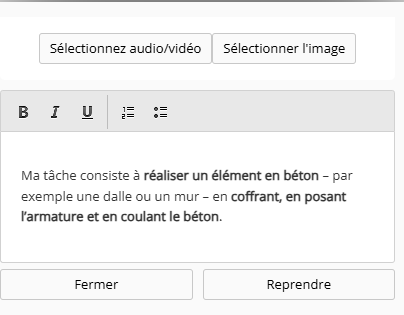
<table border="1" id="bkmrk-tu-peux-alors-ajoute" style="border-collapse: collapse; width: 100%; border-width: 1px; background-color: rgb(255, 255, 255); border-color: rgb(255, 255, 255);"><colgroup><col style="width: 73.2504%;"></col><col style="width: 12.5568%;"></col><col style="width: 14.182%;"></col></colgroup><tbody><tr><td style="border-color: rgb(255, 255, 255);">Tu peux alors ajouter plusieurs paragraphes à chaque sous-tâche, dans lesquelles tu peux répondre aux questions et ajouter des images, des vidéos ou des fichiers audio. En cliquant sur **« Reprendre »**, ton contenu est enregistré. Tu peux le modifier ou le supprimer à tout moment pendant l'exécution du mandat pratique. </td><td style="border-color: rgb(255, 255, 255);">![image.png](https://docs.swisslearninghub.help/uploads/images/gallery/2025-10/scaled-1680-/WkPWtmCHzMZlMV6t-image.png)</td><td style="border-color: rgb(255, 255, 255);">![image.png](https://docs.swisslearninghub.help/uploads/images/gallery/2025-10/scaled-1680-/Vqa0DwFJVBA0G7bv-image.png)</td></tr></tbody></table>

##### Notes

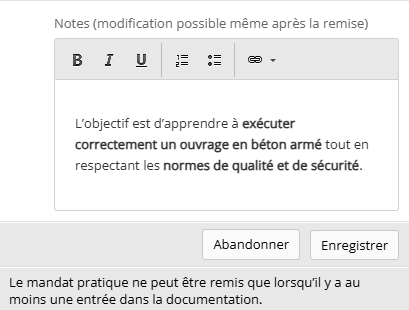
<table border="1" id="bkmrk-pendant-l%27ex%C3%A9cution%2C" style="border-collapse: collapse; width: 100%; border-width: 1px; background-color: rgb(255, 255, 255); border-color: rgb(255, 255, 255);"><colgroup><col style="width: 84.8554%;"></col><col style="width: 15.1338%;"></col></colgroup><tbody><tr><td style="border-color: rgb(255, 255, 255);">Pendant l'exécution, mais aussi après la remise du mandat pratique, tu peux ajouter des notes à la commande.</td><td style="border-color: rgb(255, 255, 255);">![image.png](https://docs.swisslearninghub.help/uploads/images/gallery/2025-10/scaled-1680-/RvSmucSZCMcJWVtF-image.png)</td></tr></tbody></table>

##### Remise

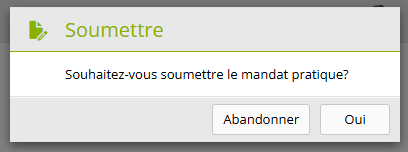
<table border="1" id="bkmrk-une-fois-que-tu-as-r-1" style="border-collapse: collapse; width: 100%; height: 126.335px; border-width: 1px; background-color: rgb(255, 255, 255); border-color: rgb(255, 255, 255);"><colgroup><col style="width: 83.779%;"></col><col style="width: 16.2102%;"></col></colgroup><tbody><tr style="height: 126.335px;"><td class="align-left" style="height: 126.335px; border-color: rgb(255, 255, 255);">Une fois que tu as rempli chaque sous-tâche, tu peux cliquer sur **« Soumettre »** en bas. </td><td style="height: 126.335px; border-color: rgb(255, 255, 255);">![image.png](https://docs.swisslearninghub.help/uploads/images/gallery/2025-10/scaled-1680-/eii9Di6UiUcPx7Cd-image.png)

![image.png](https://docs.swisslearninghub.help/uploads/images/gallery/2025-10/scaled-1680-/UYn53whxnEDWzsfU-image.png)

</td></tr></tbody></table>

<p class="callout danger">Les sous-tâches ne peuvent plus être modifiées après leur remise.</p>

Le mandat pratique est désormais soumise et visible par la personne responsable.

---

### 4. Mandats pratiques (pour les Employé-es de commerce)

<table border="1" id="bkmrk-pour-acc%C3%A9der-%C3%A0-l%27ape-2" style="border-collapse: collapse; width: 100%; border-width: 1px; background-color: rgb(255, 255, 255); border-color: rgb(255, 255, 255);"><colgroup><col style="width: 78.2504%;"></col><col style="width: 10.417%;"></col><col style="width: 11.3218%;"></col></colgroup><tbody><tr><td style="border-color: rgb(255, 255, 255);">Pour accéder à l'aperçu des mandats pratiques déjà commencées, appuie sur ce symbole : ![image.png](https://docs.swisslearninghub.help/uploads/images/gallery/2025-10/scaled-1680-/6H7uhmDcQSw2QipO-image.png) dans le coin supérieur gauche ou balaye vers la droite.</td><td style="border-color: rgb(255, 255, 255);"><span style="color: rgb(240, 0, 166);">![image.png](https://docs.swisslearninghub.help/uploads/images/gallery/2025-10/scaled-1680-/anPnqqGBvIcaRiB3-image.png)</span></td><td style="border-color: rgb(255, 255, 255);">![image.png](https://docs.swisslearninghub.help/uploads/images/gallery/2025-10/scaled-1680-/84kU8bstXn2pprSY-image.png)</td></tr></tbody></table>

#### 4.1 Status du mandat pratique

<table border="1" id="bkmrk-signe-signification%C2%A0" style="border-collapse: collapse; width: 64.5238%; height: 308px;"><colgroup><col style="width: 26.7936%;"></col><col style="width: 73.1917%;"></col></colgroup><thead><tr style="height: 29.7017px;"><td style="height: 29.7017px;">signe</td><td style="height: 29.7017px;">signification </td></tr></thead><tbody><tr style="height: 52.8977px;"><td style="height: 52.8977px;">![image.png](https://docs.swisslearninghub.help/uploads/images/gallery/2025-10/scaled-1680-/yIS0sGrdvFnLjY6n-image.png)

</td><td class="align-left" style="height: 52.8977px;">Préparation</td></tr><tr style="height: 55.9233px;"><td style="height: 55.9233px;">![image.png](https://docs.swisslearninghub.help/uploads/images/gallery/2025-10/scaled-1680-/rhSrnBdVHfdd2jPF-image.png)

</td><td style="height: 55.9233px;">En cours</td></tr><tr style="height: 53.9205px;"><td style="height: 53.9205px;">![image.png](https://docs.swisslearninghub.help/uploads/images/gallery/2025-10/scaled-1680-/ZD261Xxi2LDP3Ksn-image.png)

</td><td style="height: 53.9205px;">Soumis</td></tr><tr style="height: 54.929px;"><td style="height: 54.929px;">![image.png](https://docs.swisslearninghub.help/uploads/images/gallery/2025-10/scaled-1680-/KawWVlZVVp43vwOP-image.png)

</td><td style="height: 54.929px;">Réédition</td></tr><tr style="height: 59.929px;"><td style="height: 59.929px;">![image.png](https://docs.swisslearninghub.help/uploads/images/gallery/2025-10/scaled-1680-/pm7QR0adPfApvcmK-image.png)

</td><td style="height: 59.929px;">Terminé</td></tr></tbody></table>

---


#### 4.2 Recherche de mandats pratiques 

<table border="1" id="bkmrk-en-haut-dans-la-barr-1" style="border-collapse: collapse; width: 100%; border-width: 1px; background-color: rgb(255, 255, 255); border-color: rgb(255, 255, 255);"><colgroup><col style="width: 83.8637%;"></col><col style="width: 16.2446%;"></col></colgroup><tbody><tr><td style="border-color: rgb(255, 255, 255);">En haut dans la barre de recherche, tu peux rechercher des mandats pratiques spécifiques.</td><td style="border-color: rgb(255, 255, 255);">![image.png](https://docs.swisslearninghub.help/uploads/images/gallery/2025-10/scaled-1680-/qVY2iMvVlzbe2LIa-image.png)</td></tr></tbody></table>

---

#### 4.3 Ajout de mandats pratiques supplémentaires à traiter.

<table border="1" id="bkmrk-dans-ton-apprentissa-1" style="border-collapse: collapse; width: 100%; border-width: 1px; background-color: rgb(255, 255, 255); border-color: rgb(255, 255, 255);"><colgroup><col style="width: 83.7446%;"></col><col style="width: 16.3637%;"></col></colgroup><tbody><tr><td style="border-color: rgb(255, 255, 255);">Dans ton apprentissage, tu dois avoir terminé tous les modèles des mandats pratiques. Tu peux donc également démarrer ici des mandats pratiques non encore commencées à l'aide des modèles des mandats pratiques, en les ajoutant au semestre correspondant à l'aide du bouton **« Modèles mandat pratique »** et **« Attribuer mandat pratique ».** </td><td style="border-color: rgb(255, 255, 255);">![image.png](https://docs.swisslearninghub.help/uploads/images/gallery/2025-10/scaled-1680-/IeAQSFIf6CYKDWbd-image.png)

![image.png](https://docs.swisslearninghub.help/uploads/images/gallery/2025-10/scaled-1680-/RORD9dNcIj1kquFb-image.png)

![ZGl9hu0OgRMOqWSq-image.png](https://docs.swisslearninghub.help/uploads/images/gallery/2025-10/scaled-1680-/eGVAFrESqUNVHgPA-zgl9hu0ogrmoqwsq-image.png)

</td></tr></tbody></table>

---

#### 4.4 Traitement d'un mandat pratique

Si tu souhaites traiter une tâche pratique, il te suffit de cliquer dessus.

##### Description

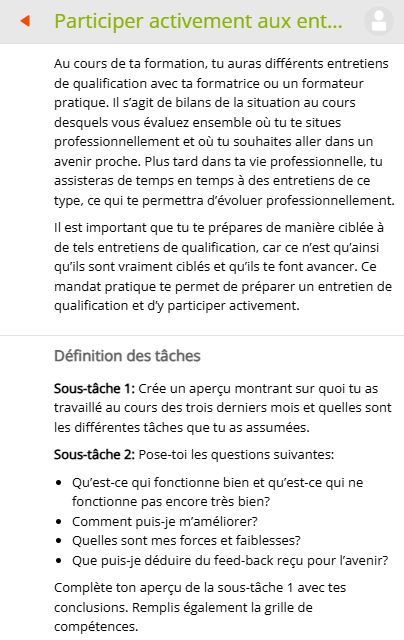
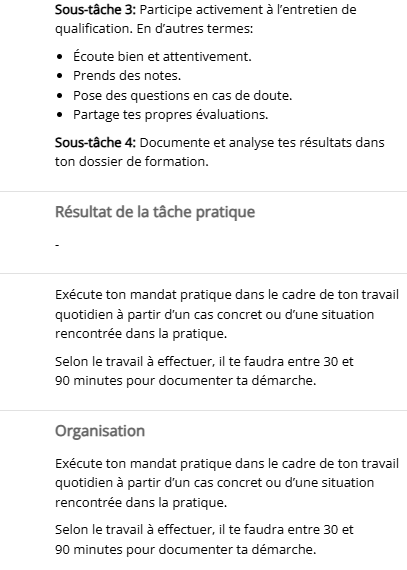
<table border="1" id="bkmrk-une-fois-que-vous-av" style="border-collapse: collapse; width: 100%; border-width: 1px; background-color: rgb(255, 255, 255); border-color: rgb(255, 255, 255);"><colgroup><col style="width: 75.9885%;"></col><col style="width: 11.7255%;"></col><col style="width: 12.2752%;"></col></colgroup><tbody><tr><td style="border-color: rgb(255, 255, 255);">Une fois que vous avez cliqué dessus, vous pouvez voir directement la description de la commande, y compris la définition de la tâche à accomplir, le résultat de la tâche pratique et l'organisation.</td><td style="border-color: rgb(255, 255, 255);">![image.png](https://docs.swisslearninghub.help/uploads/images/gallery/2025-10/scaled-1680-/Sv943EXN9miTXA3T-image.png)</td><td style="border-color: rgb(255, 255, 255);">![image.png](https://docs.swisslearninghub.help/uploads/images/gallery/2025-10/scaled-1680-/NQerQakbHBrWgClu-image.png)</td></tr></tbody></table>

##### Attribution

<table border="1" id="bkmrk-tu-peux-ensuite-d%C3%A9fi-1" style="border-collapse: collapse; width: 100%; border-width: 1px; background-color: rgb(255, 255, 255); border-color: rgb(255, 255, 255);"><colgroup><col style="width: 76.7028%;"></col><col style="width: 11.2496%;"></col><col style="width: 12.0368%;"></col></colgroup><tbody><tr><td style="border-color: rgb(255, 255, 255);">Tu peux ensuite définir les dates auxquelles tu souhaites, par exemple, terminer la documentation et l'Auto-évaluation, à quelle date la réunion doit avoir lieu et qui doit en être responsable. Tu peux enregistrer ces informations en cliquant sur **« Enregistrer ».** </td><td style="border-color: rgb(255, 255, 255);">![image.png](https://docs.swisslearninghub.help/uploads/images/gallery/2025-10/scaled-1680-/8IMX5YRVkoEqGjdO-image.png)</td><td style="border-color: rgb(255, 255, 255);">![image.png](https://docs.swisslearninghub.help/uploads/images/gallery/2025-10/scaled-1680-/JyIXmSg9Um254F1j-image.png)</td></tr></tbody></table>

<p class="callout danger">Lorsque tu cliques sur **« Enregistrer et clore la préparation »**, le statut de la commande passe de « Préparation » à « En cours » et les informations ne peuvent plus être modifiées. </p>

##### Documentation

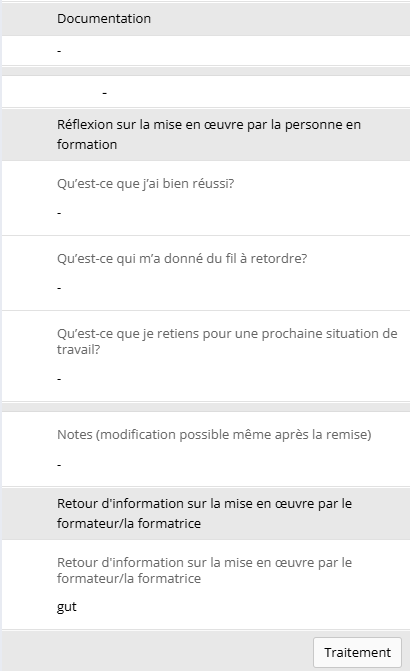
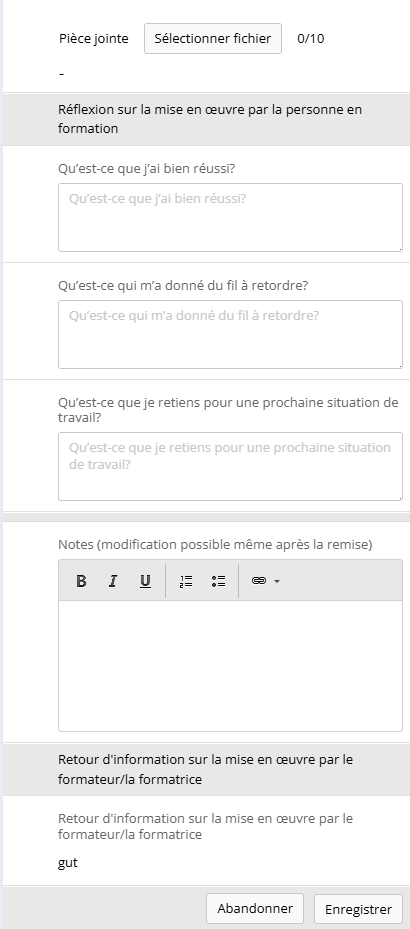
<table border="1" id="bkmrk-dans-la-section-%C2%AB-do-1" style="border-collapse: collapse; width: 100%; border-width: 1px; background-color: rgb(255, 255, 255); border-color: rgb(255, 255, 255);"><colgroup><col style="width: 77.4171%;"></col><col style="width: 11.1311%;"></col><col style="width: 11.441%;"></col></colgroup><tbody><tr><td style="border-color: rgb(255, 255, 255);">Dans la section « Documentation », tu as la possibilité de réfléchir à la mise en œuvre des différentes tâches et de joindre des fichiers à la mission en cliquant sur **« Traitement »**. En bas de page, tu verras également les commentaires de ton formateur/ta formatrice dès qu'il/elle les aura rédigés et envoyés. Tu peux également ajouter des notes à la mission, qui peuvent être modifiées même après la remise.</td><td style="border-color: rgb(255, 255, 255);">![image.png](https://docs.swisslearninghub.help/uploads/images/gallery/2025-10/scaled-1680-/1FICtSdNg5j3cE7z-image.png)</td><td style="border-color: rgb(255, 255, 255);">![image.png](https://docs.swisslearninghub.help/uploads/images/gallery/2025-10/scaled-1680-/tNGav97APtUJAcBv-image.png)</td></tr></tbody></table>


##### Auto-évaluation des compétences opérationelles

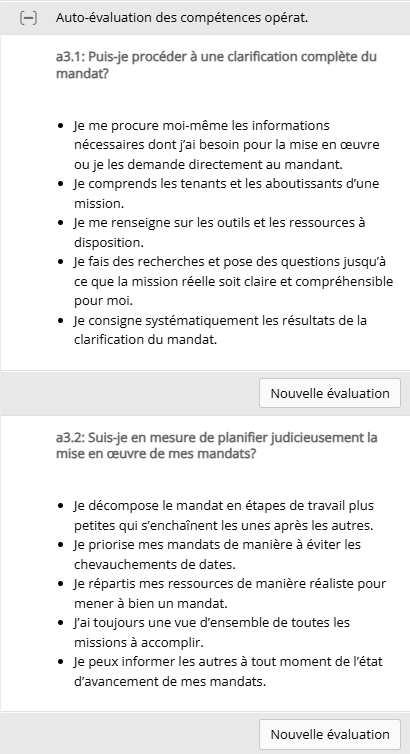
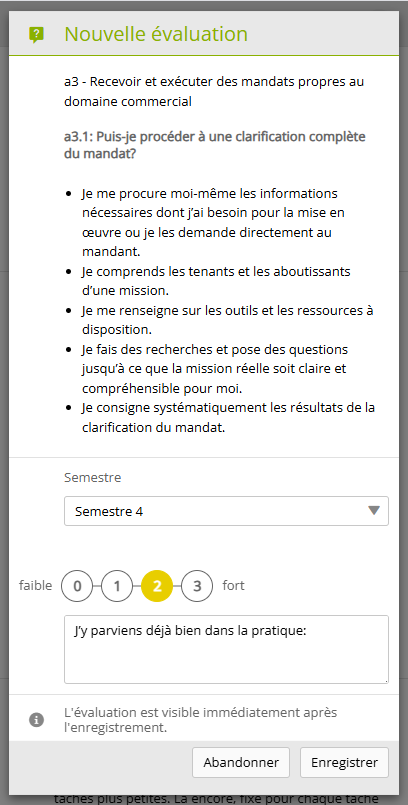
<table border="1" id="bkmrk-comme-son-nom-l%27indi" style="border-collapse: collapse; width: 100%; border-width: 1px; background-color: rgb(255, 255, 255); border-color: rgb(255, 255, 255);"><colgroup><col style="width: 75.1552%;"></col><col style="width: 12.0821%;"></col><col style="width: 12.7519%;"></col></colgroup><tbody><tr><td style="border-color: rgb(255, 255, 255);">Comme son nom l'indique, tu peux ici noter ton auto-évaluation concernant tes compétences opérationnelles. Pour ce faire, clique sur **« Nouvelle évaluation »**. Une fois cette option sélectionnée, tu peux choisir le semestre, évaluer tes performances de 0 à 4 à l'aide du classement et noter tes réflexions par écrit.</td><td style="border-color: rgb(255, 255, 255);">![image.png](https://docs.swisslearninghub.help/uploads/images/gallery/2025-10/scaled-1680-/ihr0DmoerWTn6Yoq-image.png)</td><td style="border-color: rgb(255, 255, 255);">![image.png](https://docs.swisslearninghub.help/uploads/images/gallery/2025-10/scaled-1680-/VHpZy0lI4nb1Jcs3-image.png)</td></tr></tbody></table>

##### Remise

<table border="1" id="bkmrk-une-fois-que-tu-as-r-3" style="border-collapse: collapse; width: 100%; border-width: 1px; background-color: rgb(255, 255, 255); border-color: rgb(255, 255, 255);"><colgroup><col style="width: 84.4872%;"></col><col style="width: 15.502%;"></col></colgroup><tbody><tr><td style="border-color: rgb(255, 255, 255);">Une fois que tu as rempli chaque sous-tâche, tu peux cliquer sur **« Soumettre »** en bas. </td><td style="border-color: rgb(255, 255, 255);">![image.png](https://docs.swisslearninghub.help/uploads/images/gallery/2025-10/scaled-1680-/eii9Di6UiUcPx7Cd-image.png)

![image.png](https://docs.swisslearninghub.help/uploads/images/gallery/2025-10/scaled-1680-/UYn53whxnEDWzsfU-image.png)

</td></tr></tbody></table>

<p class="callout danger">Les sous-tâches ne peuvent plus être modifiées après leur remise.</p>

Le mandat pratique est désormais soumise et visible par la personne responsable.

---

<span style="color: rgb(34, 34, 34); font-family: -apple-system, BlinkMacSystemFont, 'Segoe UI', Oxygen, Ubuntu, Roboto, Cantarell, 'Fira Sans', 'Droid Sans', 'Helvetica Neue', sans-serif; font-size: 2.333em; font-weight: 400;">5. Profil</span>

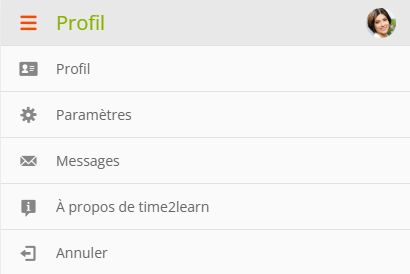
<table border="1" id="bkmrk-en-cliquant-sur-ton-" style="border-collapse: collapse; width: 100%; border-width: 1px; background-color: rgb(255, 255, 255); border-color: rgb(255, 255, 255);"><colgroup><col style="width: 83.3875%;"></col><col style="width: 16.7208%;"></col></colgroup><tbody><tr><td style="border-color: rgb(255, 255, 255);">En cliquant sur ton profil en haut à droite, tu peux modifier tes paramètres, consulter les messages reçus ou cliquer sur **« À propos de time2learn »** si tu as des questions ou des problèmes.</td><td style="border-color: rgb(255, 255, 255);">[![image.png](https://docs.swisslearninghub.help/uploads/images/gallery/2025-10/scaled-1680-/NJldHbDXfRSj3I2E-image.png)](https://docs.swisslearninghub.help/uploads/images/gallery/2025-10/NJldHbDXfRSj3I2E-image.png)</td></tr></tbody></table>

# Guide de l'AMF

- [Guide de l’authentification multifactorielle (AMF).pdf](https://docs.swisslearninghub.help/attachments/1623)