# Technical requirements
Here you will find answers to which technical requirements must be met before you can work with the tool?
CAN I WORK ON THE TRAINING WITHOUT BEING CONNECTED TO THE INTERNET?
No, you cannot log into the program offline. To access the training, you need internet access and an up-to-date browser.
WHAT BROWSERS ARE SUPPORTED?
**Browsers**
The latest versions of Microsoft Edge, Firefox, Chrome and Safari
**Operating system**
Current Windows, macOS, iOS and Android versions
If the technical conditions are not met, an error-free operation of the application cannot be guaranteed.
DOES THE TRAINING ALSO RUN ON MY CELL PHONE?
Yes, you can also use your smartphone (Android or iOS) to work on the training on the go. Again, we recommend the latest version of the operating system/browser.
However, we recommend working on the training on a tablet or a PC.
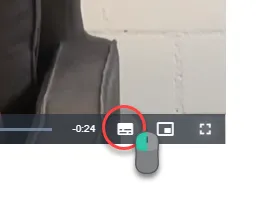
HOW CAN I TURN THE SUBTITLES ON/OFF IN VIDEOS?
If you hover the mouse over the video, a control menu with a keyboard icon appears at the bottom. You can use this icon to display or hide the subtitles.
[](https://docs.swisslearninghub.help/uploads/images/gallery/2025-04/TytFXlDDA8b1FXNs-image.png)