# Bedienungshandbuch

Alles zu **time2learn My Skills**

# 1. Was ist time2learn My Skills?

<table border="1" id="bkmrk-%C2%A0-time2learn-my-skil" style="border-collapse: collapse; width: 100%; border-width: 1px; background-color: rgb(255, 255, 255); border-color: rgb(255, 255, 255); height: 239.122px;"><colgroup><col style="width: 68.2685%;"></col><col style="width: 31.8399%;"></col></colgroup><tbody><tr style="height: 239.122px;"><td style="border-color: rgb(255, 255, 255); height: 239.122px;">**time2learn My Skills** ist ein kostenloses Angebot, welches den angehenden Berufsleuten ermöglicht, nach ihrem Lehrabschluss sicher und zuverlässig auf ihre erarbeiteten Lernunterlagen zugreifen zu können. Zusätzlich werden die erlernten Kompetenzen und die gesammelten Unterlagen aufgelistet, welche jederzeit ergänzt, geändert oder gelöscht werden können. Darüber hinaus, besteht die Möglichkeit, aus allen Angegebenen Informationen einen im Nachhinein bearbeitbaren Lebenslauf generieren zu lassen. Es sind zudem weitere Services verfügbar, die auf Wunsch des Anwenders genutzt werden können wie zum Beispiel individuell zugeschnittene Job-Angebote.

</td><td style="border-color: rgb(255, 255, 255); height: 239.122px;">[![image.png](https://docs.swisslearninghub.help/uploads/images/gallery/2026-01/scaled-1680-/3IZlwbFGlZfhy5VG-image.png)](https://docs.swisslearninghub.help/uploads/images/gallery/2026-01/3IZlwbFGlZfhy5VG-image.png)</td></tr></tbody></table>

[![image.png](https://docs.swisslearninghub.help/uploads/images/gallery/2025-08/scaled-1680-/WriiRTuSkXJBUgXC-image.png)](https://vimeo.com/1084162733?fl=pl&fe=sh)

# 2. Registrierung über time2learn Young Talents

##### <span class="TextRun SCXW148694066 BCX8" data-contrast="auto" lang="DE-CH" xml:lang="DE-CH"><span class="NormalTextRun SCXW148694066 BCX8">Popup Benachrichtigung</span></span>

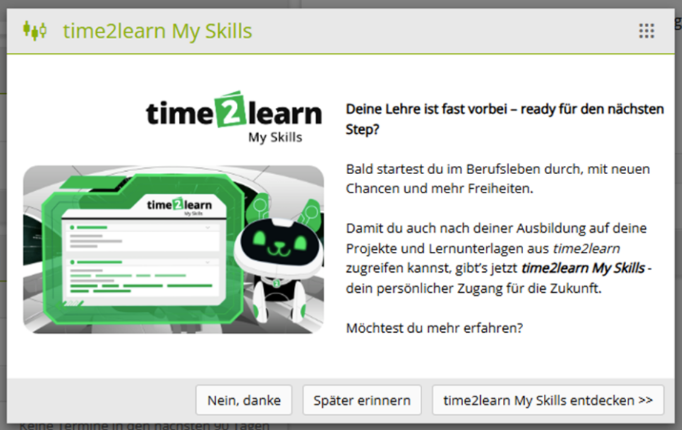
<span class="TextRun SCXW148694066 BCX8" data-contrast="auto" lang="DE-CH" xml:lang="DE-CH"><span class="NormalTextRun SCXW148694066 BCX8">Lernende im letzten Semester </span><span class="NormalTextRun SCXW148694066 BCX8">werden </span><span class="NormalTextRun SCXW148694066 BCX8">durch</span><span class="NormalTextRun SCXW148694066 BCX8"> eine Popup</span><span class="NormalTextRun SCXW148694066 BCX8"> Maske</span><span class="NormalTextRun SCXW148694066 BCX8"> auf **time2learn Young Talents** über </span></span><span class="TextRun SCXW148694066 BCX8" data-contrast="auto" lang="DE-CH" xml:lang="DE-CH"><span class="NormalTextRun SCXW148694066 BCX8">time2learn My Skills informiert. Ihnen </span></span><span class="TextRun SCXW148694066 BCX8" data-contrast="auto" lang="DE-CH" xml:lang="DE-CH"><span class="NormalTextRun SCXW148694066 BCX8">werden</span><span class="NormalTextRun SCXW148694066 BCX8"> drei Möglichkeiten zu Verfügung gestellt.</span></span><span class="EOP SCXW148694066 BCX8" data-ccp-props="{"335551550":1,"335551620":1}"> </span>

<table border="1" id="bkmrk-falls-sie%C2%A0%C2%ABnein%2C-dan" style="border-collapse: collapse; width: 100%; border-width: 1px; background-color: rgb(255, 255, 255); border-color: rgb(255, 255, 255);"><colgroup><col style="width: 70.4301%;"></col><col style="width: 29.559%;"></col></colgroup><tbody><tr><td style="border-color: rgb(255, 255, 255);"><span class="TextRun SCXW148694066 BCX8" data-contrast="auto" lang="DE-CH" xml:lang="DE-CH"><span class="NormalTextRun SCXW148694066 BCX8">Falls sie </span></span>**<span class="TextRun SCXW148694066 BCX8" data-contrast="auto" lang="DE-CH" xml:lang="DE-CH"><span class="NormalTextRun SCXW148694066 BCX8">«Nein, danke.»</span></span>**<span class="TextRun SCXW148694066 BCX8" data-contrast="auto" lang="DE-CH" xml:lang="DE-CH"><span class="NormalTextRun SCXW148694066 BCX8"> wählen, wird ihnen </span><span class="NormalTextRun ContextualSpellingAndGrammarErrorV2Themed SCXW148694066 BCX8">das</span><span class="NormalTextRun ContextualSpellingAndGrammarErrorV2Themed SCXW148694066 BCX8"> Popup</span><span class="NormalTextRun SCXW148694066 BCX8"> nicht mehr angezeigt</span><span class="NormalTextRun SCXW148694066 BCX8">.</span></span><span class="EOP SCXW148694066 BCX8" data-ccp-props="{"335551550":1,"335551620":1}"> </span>

<span class="TextRun SCXW148694066 BCX8" data-contrast="auto" lang="DE-CH" xml:lang="DE-CH"><span class="NormalTextRun SCXW148694066 BCX8">Falls die Lernende</span><span class="NormalTextRun SCXW148694066 BCX8">n</span> </span>**<span class="TextRun SCXW148694066 BCX8" data-contrast="auto" lang="DE-CH" xml:lang="DE-CH"><span class="NormalTextRun SCXW148694066 BCX8">«Später erinnern»</span></span>**<span class="TextRun SCXW148694066 BCX8" data-contrast="auto" lang="DE-CH" xml:lang="DE-CH"><span class="NormalTextRun SCXW148694066 BCX8"> wählen, wird </span><span class="NormalTextRun SCXW148694066 BCX8">das</span><span class="NormalTextRun SCXW148694066 BCX8"> Popup beim nächsten Login wieder angezeigt.</span></span>

<span class="TextRun SCXW148694066 BCX8" data-contrast="auto" lang="DE-CH" xml:lang="DE-CH"><span class="NormalTextRun SCXW148694066 BCX8">Beim Klick auf </span></span>**<span class="TextRun SCXW148694066 BCX8" data-contrast="auto" lang="DE-CH" xml:lang="DE-CH"><span class="NormalTextRun SCXW148694066 BCX8">«time2learn My Skills entdecken»</span></span>**<span class="TextRun SCXW148694066 BCX8" data-contrast="auto" lang="DE-CH" xml:lang="DE-CH"><span class="NormalTextRun SCXW148694066 BCX8"> gelangen die Lernende</span><span class="NormalTextRun SCXW148694066 BCX8">n</span><span class="NormalTextRun SCXW148694066 BCX8"> direkt auf die time2learn My Skills Registrationsseite.</span></span><span class="EOP SCXW148694066 BCX8" data-ccp-props="{"335551550":1,"335551620":1}"> </span>

<span class="TextRun SCXW148694066 BCX8" data-contrast="auto" lang="DE-CH" xml:lang="DE-CH"><span class="NormalTextRun SCXW148694066 BCX8">In all den drei Fällen bleibt der Menüpunkt "time2learn My Skills" vorhanden.</span></span><span class="EOP SCXW148694066 BCX8" data-ccp-props="{"335551550":1,"335551620":1}"> </span>

</td><td style="border-color: rgb(255, 255, 255);">![image.png](https://docs.swisslearninghub.help/uploads/images/gallery/2025-08/scaled-1680-/D6jT5rM8VJ5hEqVP-image.png)</td></tr></tbody></table>

---

##### <span class="TextRun SCXW117078204 BCX8" data-contrast="auto" lang="DE-CH" xml:lang="DE-CH"><span class="NormalTextRun SCXW117078204 BCX8">Registrierung über time2learn Young Talents</span></span><span class="EOP SCXW117078204 BCX8" data-ccp-props="{"335551550":6,"335551620":6}"> </span>

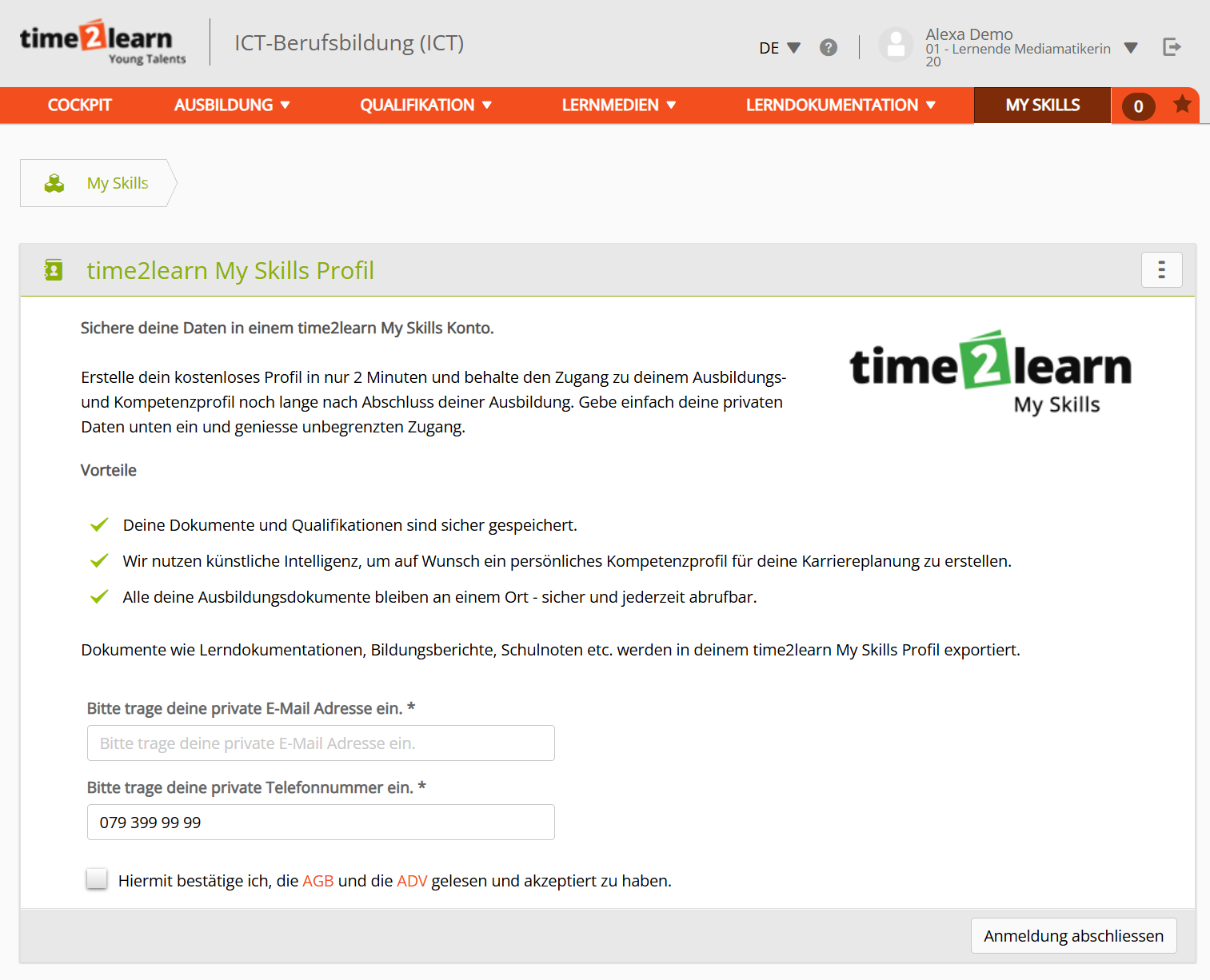
<table border="1" id="bkmrk-lernende-k%C3%B6nnen-sich" style="border-collapse: collapse; width: 100%; border-width: 1px; background-color: rgb(255, 255, 255); border-color: rgb(255, 255, 255);"><colgroup><col style="width: 76.9815%;"></col><col style="width: 23.0077%;"></col></colgroup><tbody><tr><td style="border-color: rgb(255, 255, 255);"><span class="TextRun SCXW117078204 BCX8" data-contrast="auto" lang="DE-CH" xml:lang="DE-CH"><span class="NormalTextRun SCXW117078204 BCX8">Lernende können sich auch jederzeit </span><span class="NormalTextRun SCXW117078204 BCX8">unkompliziert</span><span class="NormalTextRun SCXW117078204 BCX8"> auf time2learn Young Talents registrieren. Dafür müssen </span><span class="NormalTextRun SCXW117078204 BCX8">lediglich</span><span class="NormalTextRun SCXW117078204 BCX8"> die private </span><span class="NormalTextRun SCXW117078204 BCX8">E-Mail-Adresse</span><span class="NormalTextRun SCXW117078204 BCX8"> und die</span><span class="NormalTextRun SCXW117078204 BCX8"> private Telefonnummer eingegeben und die AGB und ADV gelesen und akzeptiert werden.</span></span><span class="EOP SCXW117078204 BCX8" data-ccp-props="{"335551550":6,"335551620":6}"> </span></td><td style="border-color: rgb(255, 255, 255);">![image.png](https://docs.swisslearninghub.help/uploads/images/gallery/2025-08/scaled-1680-/WRnWEY8hcNc7vXwC-image.png)</td></tr></tbody></table>

---

##### Portfolio Übermittlung

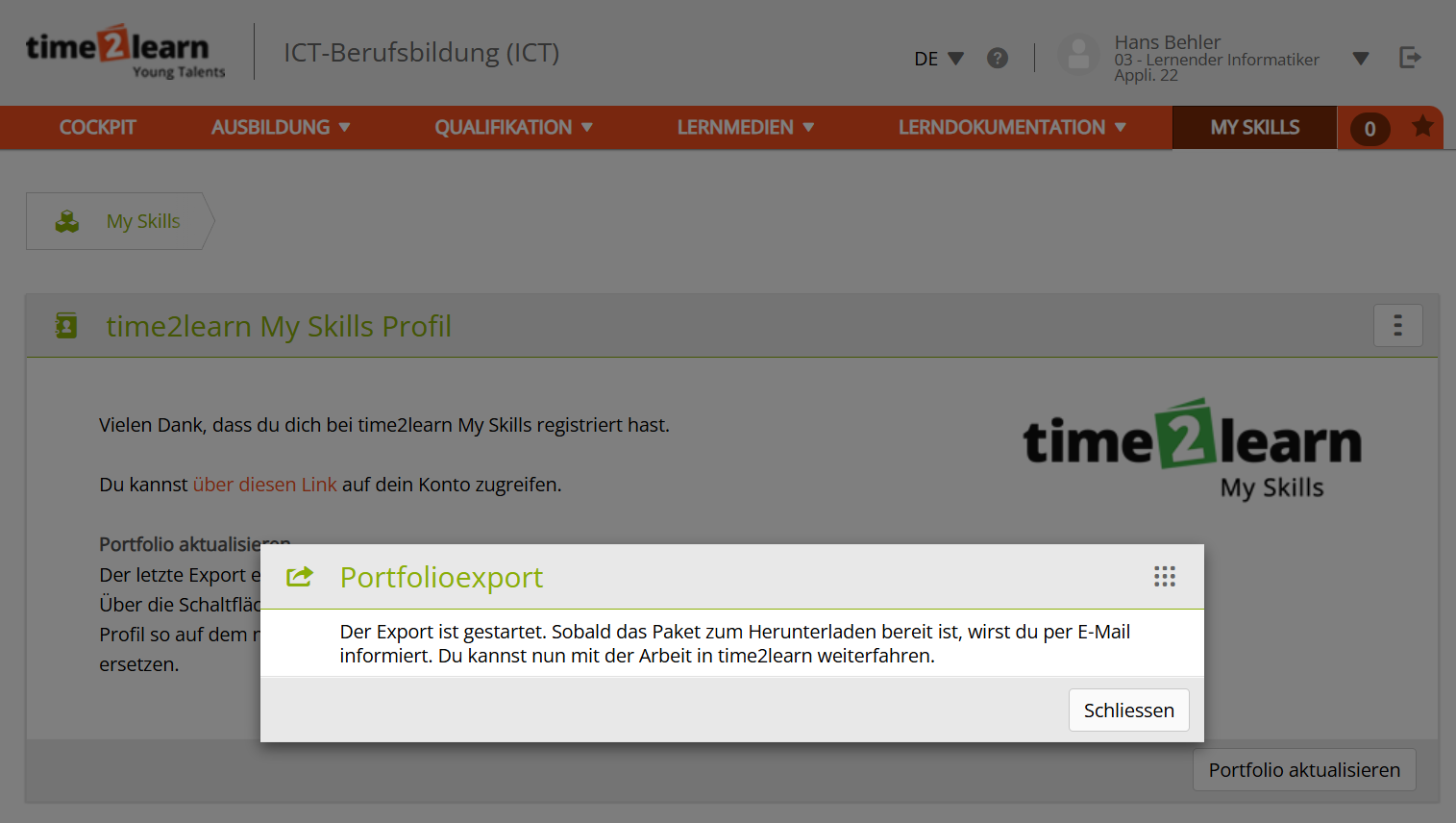
<table border="1" id="bkmrk-sobald-sich-eine-ler" style="border-collapse: collapse; width: 100%; border-width: 1px; background-color: rgb(255, 255, 255); border-color: rgb(255, 255, 255);"><colgroup><col style="width: 61.9409%;"></col><col style="width: 18.98%;"></col><col style="width: 19.0683%;"></col></colgroup><tbody><tr><td style="border-color: rgb(255, 255, 255);">Sobald sich eine lernende Person registriert, wird auch das Portfolio an das neue Profil übermittelt. Dies kann einige Zeit dauern. Sobald die Übermittlung fertig ist, wird die lernende Person per E-Mail informiert. Gleichzeitig wird ein Willkommens-E-Mail für das neue Profil versandt, mit der Aufforderung sich ein Passwort zu setzen. </td><td style="border-color: rgb(255, 255, 255);">[![Screenshot 2025-08-26 145724.png](https://docs.swisslearninghub.help/uploads/images/gallery/2025-08/scaled-1680-/1NMqtkPIW4LfYuu4-screenshot-2025-08-26-145724.png)](https://docs.swisslearninghub.help/uploads/images/gallery/2025-08/1NMqtkPIW4LfYuu4-screenshot-2025-08-26-145724.png)</td><td style="border-color: rgb(255, 255, 255);">[![Screenshot 2025-08-26 144630.png](https://docs.swisslearninghub.help/uploads/images/gallery/2025-08/scaled-1680-/tqprl3LWbXCP7J2V-screenshot-2025-08-26-144630.png)](https://docs.swisslearninghub.help/uploads/images/gallery/2025-08/tqprl3LWbXCP7J2V-screenshot-2025-08-26-144630.png)</td></tr></tbody></table>

# 3. Registrierung über SEPHIR

##### <span class="TextRun SCXW148694066 BCX8" data-contrast="auto" lang="DE-CH" xml:lang="DE-CH"><span class="NormalTextRun SCXW148694066 BCX8">Popup Benachrichtigung</span></span>

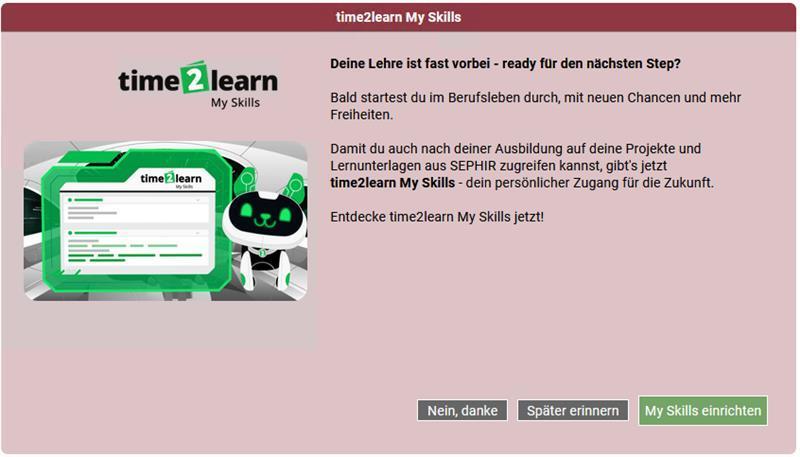
<span class="TextRun SCXW148694066 BCX8" data-contrast="auto" lang="DE-CH" xml:lang="DE-CH"><span class="NormalTextRun SCXW148694066 BCX8">Lernende im letzten Semester </span><span class="NormalTextRun SCXW148694066 BCX8">werden </span><span class="NormalTextRun SCXW148694066 BCX8">durch</span><span class="NormalTextRun SCXW148694066 BCX8"> eine Popup</span><span class="NormalTextRun SCXW148694066 BCX8"> Maske</span><span class="NormalTextRun SCXW148694066 BCX8"> auf **SEPHIR** über </span></span><span class="TextRun SCXW148694066 BCX8" data-contrast="auto" lang="DE-CH" xml:lang="DE-CH"><span class="NormalTextRun SCXW148694066 BCX8">time2learn My Skills</span></span><span class="TextRun SCXW148694066 BCX8" data-contrast="auto" lang="DE-CH" xml:lang="DE-CH"><span class="NormalTextRun SCXW148694066 BCX8"> informiert. </span><span class="NormalTextRun SCXW148694066 BCX8">Ihnen werden</span><span class="NormalTextRun SCXW148694066 BCX8"> drei Möglichkeiten zu Verfügung gestellt.</span></span><span class="EOP SCXW148694066 BCX8" data-ccp-props="{"335551550":1,"335551620":1}"> </span>

<table border="1" id="bkmrk-falls-sie%C2%A0%C2%ABnein%2C-dan" style="border-collapse: collapse; width: 100%; border-width: 1px; background-color: rgb(255, 255, 255); border-color: rgb(255, 255, 255);"><colgroup><col style="width: 67.9113%;"></col><col style="width: 32.197%;"></col></colgroup><tbody><tr><td style="border-color: rgb(255, 255, 255);"><span class="TextRun SCXW148694066 BCX8" data-contrast="auto" lang="DE-CH" xml:lang="DE-CH"><span class="NormalTextRun SCXW148694066 BCX8">Falls sie </span></span>**<span class="TextRun SCXW148694066 BCX8" data-contrast="auto" lang="DE-CH" xml:lang="DE-CH"><span class="NormalTextRun SCXW148694066 BCX8">«Nein, danke.»</span></span>**<span class="TextRun SCXW148694066 BCX8" data-contrast="auto" lang="DE-CH" xml:lang="DE-CH"><span class="NormalTextRun SCXW148694066 BCX8"> wählen, wird ihnen </span><span class="NormalTextRun ContextualSpellingAndGrammarErrorV2Themed SCXW148694066 BCX8">das</span><span class="NormalTextRun ContextualSpellingAndGrammarErrorV2Themed SCXW148694066 BCX8"> Popup</span><span class="NormalTextRun SCXW148694066 BCX8"> nicht mehr angezeigt</span><span class="NormalTextRun SCXW148694066 BCX8">.</span></span><span class="EOP SCXW148694066 BCX8" data-ccp-props="{"335551550":1,"335551620":1}"> </span>

<span class="TextRun SCXW148694066 BCX8" data-contrast="auto" lang="DE-CH" xml:lang="DE-CH"><span class="NormalTextRun SCXW148694066 BCX8">Falls die Lernende</span><span class="NormalTextRun SCXW148694066 BCX8">n</span> </span>**<span class="TextRun SCXW148694066 BCX8" data-contrast="auto" lang="DE-CH" xml:lang="DE-CH"><span class="NormalTextRun SCXW148694066 BCX8">«Später erinnern»</span></span>**<span class="TextRun SCXW148694066 BCX8" data-contrast="auto" lang="DE-CH" xml:lang="DE-CH"><span class="NormalTextRun SCXW148694066 BCX8"> wählen, wird </span><span class="NormalTextRun SCXW148694066 BCX8">das</span><span class="NormalTextRun SCXW148694066 BCX8"> Popup beim nächsten Login wieder angezeigt.</span></span><span class="EOP SCXW148694066 BCX8" data-ccp-props="{"335551550":1,"335551620":1}"> </span>

<span class="TextRun SCXW148694066 BCX8" data-contrast="auto" lang="DE-CH" xml:lang="DE-CH"><span class="NormalTextRun SCXW148694066 BCX8">Beim Klick auf </span></span>**<span class="TextRun SCXW148694066 BCX8" data-contrast="auto" lang="DE-CH" xml:lang="DE-CH"><span class="NormalTextRun SCXW148694066 BCX8">«time2learn My Skills einrichten»</span></span>**<span class="TextRun SCXW148694066 BCX8" data-contrast="auto" lang="DE-CH" xml:lang="DE-CH"><span class="NormalTextRun SCXW148694066 BCX8"> gelangen die Lernende</span><span class="NormalTextRun SCXW148694066 BCX8">n</span><span class="NormalTextRun SCXW148694066 BCX8"> direkt auf die time2learn My Skills Registrationsseite.</span></span><span class="EOP SCXW148694066 BCX8" data-ccp-props="{"335551550":1,"335551620":1}"> </span>

<span class="TextRun SCXW148694066 BCX8" data-contrast="auto" lang="DE-CH" xml:lang="DE-CH"><span class="NormalTextRun SCXW148694066 BCX8">In all den drei Fällen bleibt der Menüpunkt "time2learn My Skills" vorhanden.</span></span><span class="EOP SCXW148694066 BCX8" data-ccp-props="{"335551550":1,"335551620":1}"> </span>

</td><td style="border-color: rgb(255, 255, 255);">[![Cwbw9ogVIMn3y1qP-21311d13-e562-4b35-b473-aebf747e8202.jpg](https://docs.swisslearninghub.help/uploads/images/gallery/2025-11/scaled-1680-/QRrDP3Ogq5dY7y46-cwbw9ogvimn3y1qp-21311d13-e562-4b35-b473-aebf747e8202.jpg)](https://docs.swisslearninghub.help/uploads/images/gallery/2025-11/QRrDP3Ogq5dY7y46-cwbw9ogvimn3y1qp-21311d13-e562-4b35-b473-aebf747e8202.jpg)</td></tr></tbody></table>

---

##### <span class="TextRun SCXW117078204 BCX8" data-contrast="auto" lang="DE-CH" xml:lang="DE-CH"><span class="NormalTextRun SCXW117078204 BCX8">Registrierung über SEPHIR</span></span>

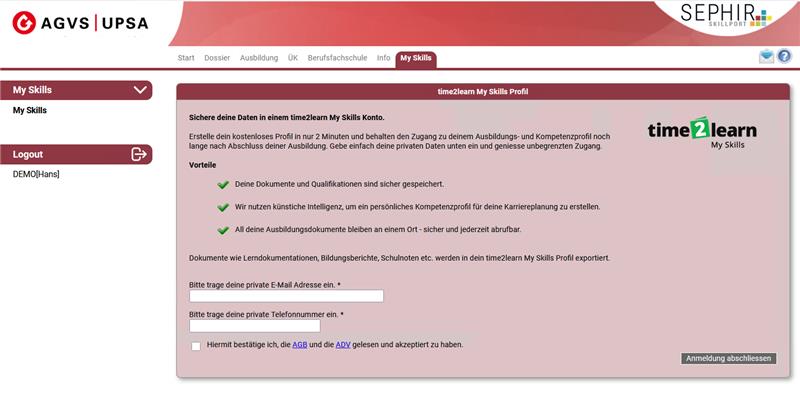
<table border="1" id="bkmrk-lernende-k%C3%B6nnen-sich" style="border-collapse: collapse; width: 100%; border-width: 1px; background-color: rgb(255, 255, 255); border-color: rgb(255, 255, 255);"><colgroup><col style="width: 72.9399%;"></col><col style="width: 27.0492%;"></col></colgroup><tbody><tr><td style="border-color: rgb(255, 255, 255);"><span class="TextRun SCXW117078204 BCX8" data-contrast="auto" lang="DE-CH" xml:lang="DE-CH"><span class="NormalTextRun SCXW117078204 BCX8">Lernende können sich auch jederzeit </span><span class="NormalTextRun SCXW117078204 BCX8">unkompliziert</span><span class="NormalTextRun SCXW117078204 BCX8"> auf SEPHIR registrieren. Dafür müssen </span><span class="NormalTextRun SCXW117078204 BCX8">lediglich</span><span class="NormalTextRun SCXW117078204 BCX8"> die private </span><span class="NormalTextRun SCXW117078204 BCX8">E-Mail-Adresse</span><span class="NormalTextRun SCXW117078204 BCX8"> und die</span><span class="NormalTextRun SCXW117078204 BCX8"> private Telefonnummer eingegeben und die AGB und ADV gelesen und akzeptiert werden.</span></span><span class="EOP SCXW117078204 BCX8" data-ccp-props="{"335551550":6,"335551620":6}"> </span></td><td style="border-color: rgb(255, 255, 255);">[![03e6c486-7e8f-4024-ad49-73b68dbccc81.jpg](https://docs.swisslearninghub.help/uploads/images/gallery/2025-11/scaled-1680-/vWItgOSyn5PU6SVg-03e6c486-7e8f-4024-ad49-73b68dbccc81.jpg)](https://docs.swisslearninghub.help/uploads/images/gallery/2025-11/vWItgOSyn5PU6SVg-03e6c486-7e8f-4024-ad49-73b68dbccc81.jpg)</td></tr></tbody></table>

---

##### Portfolio Übermittlung

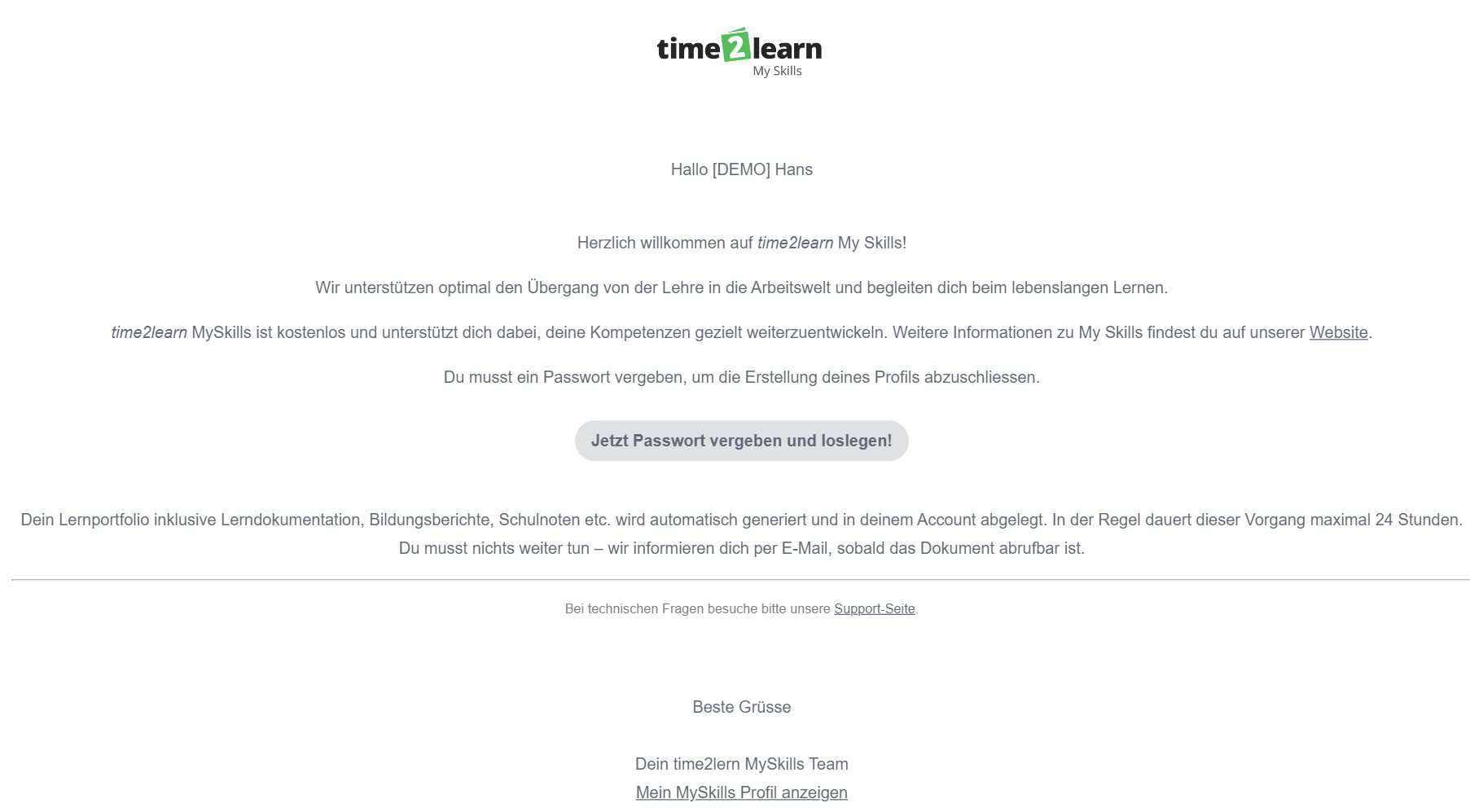
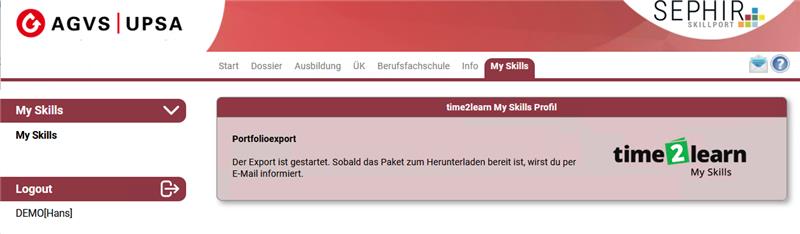
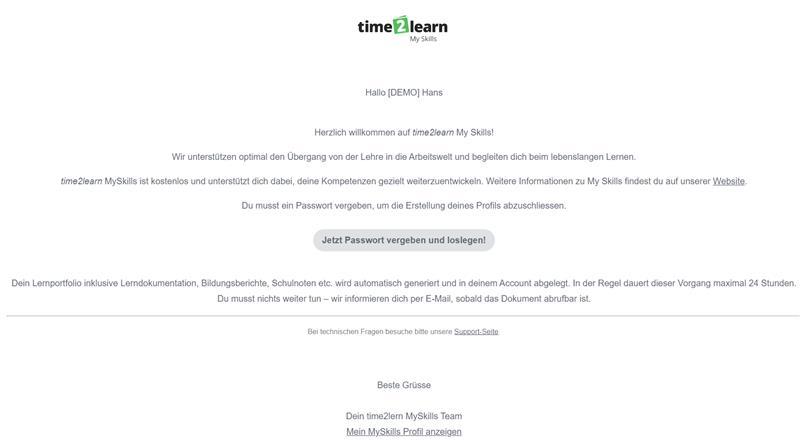
<table border="1" id="bkmrk-sobald-sich-eine-ler" style="border-collapse: collapse; width: 100%; border-width: 1px; background-color: rgb(255, 255, 255); border-color: rgb(255, 255, 255);"><colgroup><col style="width: 73.8637%;"></col><col style="width: 26.2446%;"></col></colgroup><tbody><tr><td style="border-color: rgb(255, 255, 255);">Sobald sich eine lernende Person registriert, wird auch das Portfolio an das neue Profil übermittelt. Dies kann einige Zeit dauern. Sobald die Übermittlung fertig ist, wird die lernende Person per E-Mail informiert. Gleichzeitig wird ein Willkommens-E-Mail für das neue Profil versandt, mit der Aufforderung sich ein Passwort zu setzen.

</td><td style="border-color: rgb(255, 255, 255);">[![a75e6a68-b8d8-477a-b8b2-2ef574867991.jpg](https://docs.swisslearninghub.help/uploads/images/gallery/2025-11/scaled-1680-/hS7qqfLiFzHwupcB-a75e6a68-b8d8-477a-b8b2-2ef574867991.jpg)](https://docs.swisslearninghub.help/uploads/images/gallery/2025-11/hS7qqfLiFzHwupcB-a75e6a68-b8d8-477a-b8b2-2ef574867991.jpg)

[![1ef44bcc-fbfa-493d-8807-38b5323bfe58.jpg](https://docs.swisslearninghub.help/uploads/images/gallery/2025-11/scaled-1680-/tvIhaFtNqsfE6D7G-1ef44bcc-fbfa-493d-8807-38b5323bfe58.jpg)](https://docs.swisslearninghub.help/uploads/images/gallery/2025-11/tvIhaFtNqsfE6D7G-1ef44bcc-fbfa-493d-8807-38b5323bfe58.jpg)
</td></tr></tbody></table>

# 4. Ab- und Anmeldung bei time2learn My Skills

#### Anmeldung

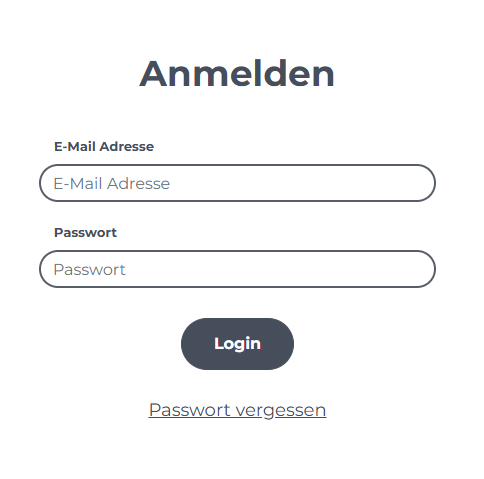
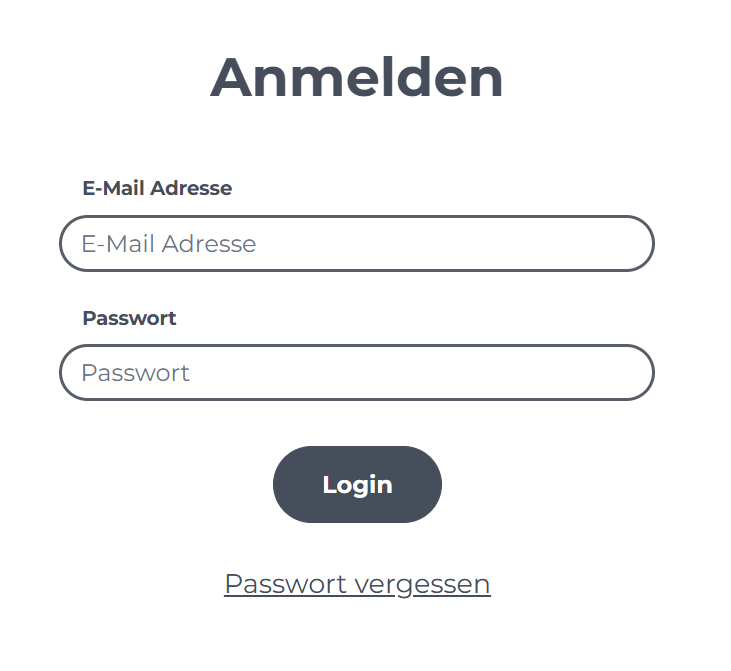
<table border="1" id="bkmrk-sobald-der-link-in-d" style="border-collapse: collapse; width: 100%; border-width: 1px; background-color: rgb(255, 255, 255); border-color: rgb(255, 255, 255);"><colgroup><col style="width: 80.1732%;"></col><col style="width: 19.9351%;"></col></colgroup><tbody><tr><td style="border-color: rgb(255, 255, 255);">Sobald der [Link](https://myskills.time2learn.com/de/myskills/login) in der Willkommens-E-Mail geöffnet wird, kannst du dein individuelles Passwort setzen und dich anschliessend mit deiner E-Mail und dem gesetzten Passwort anmelden.

Falls du bereits einen Account hast, kannst du dich in deinem Browser mit deiner E-Mail und dem Passwort anmelden.

</td><td style="border-color: rgb(255, 255, 255);">[![Screenshot 2025-08-26 144153.png](https://docs.swisslearninghub.help/uploads/images/gallery/2025-08/scaled-1680-/iW3oFgcVxD6HhBmK-screenshot-2025-08-26-144153.png)](https://myskills.time2learn.com/de/myskills/login)</td></tr></tbody></table>

---

#### Abmeldung

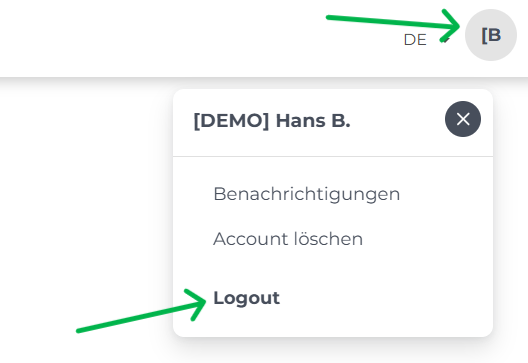
<table border="1" id="bkmrk-abmelden-kannst-du-d" style="border-collapse: collapse; width: 100%; border-width: 1px; background-color: rgb(255, 255, 255); border-color: rgb(255, 255, 255);"><colgroup><col style="width: 78.0304%;"></col><col style="width: 22.078%;"></col></colgroup><tbody><tr><td style="border-color: rgb(255, 255, 255);">Abmelden kannst du dich, wenn du auf dein Profil klickst und den Button **"Logout"** anwendest.</td><td style="border-color: rgb(255, 255, 255);">[![image.png](https://docs.swisslearninghub.help/uploads/images/gallery/2025-08/scaled-1680-/hVLydE1S0DUOR2qH-image.png)](https://docs.swisslearninghub.help/uploads/images/gallery/2025-08/hVLydE1S0DUOR2qH-image.png)</td></tr></tbody></table>

# 5. Funktionen in time2learn My Skills

#### 1. Übersicht

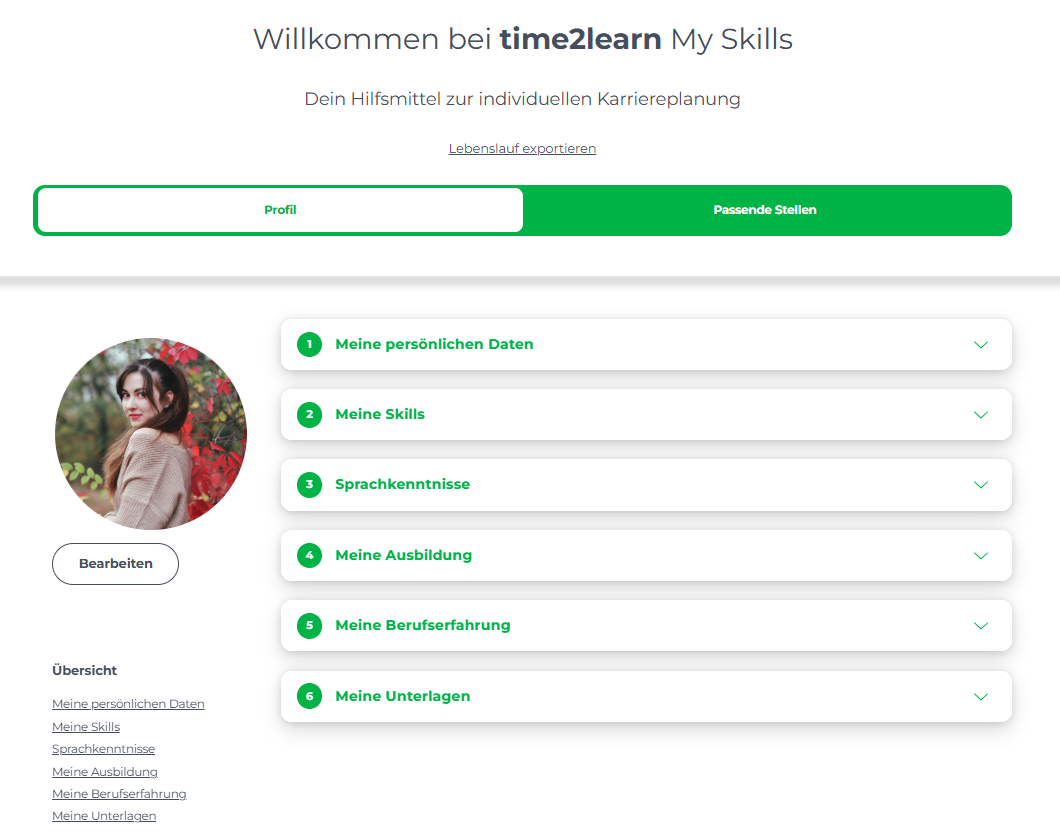
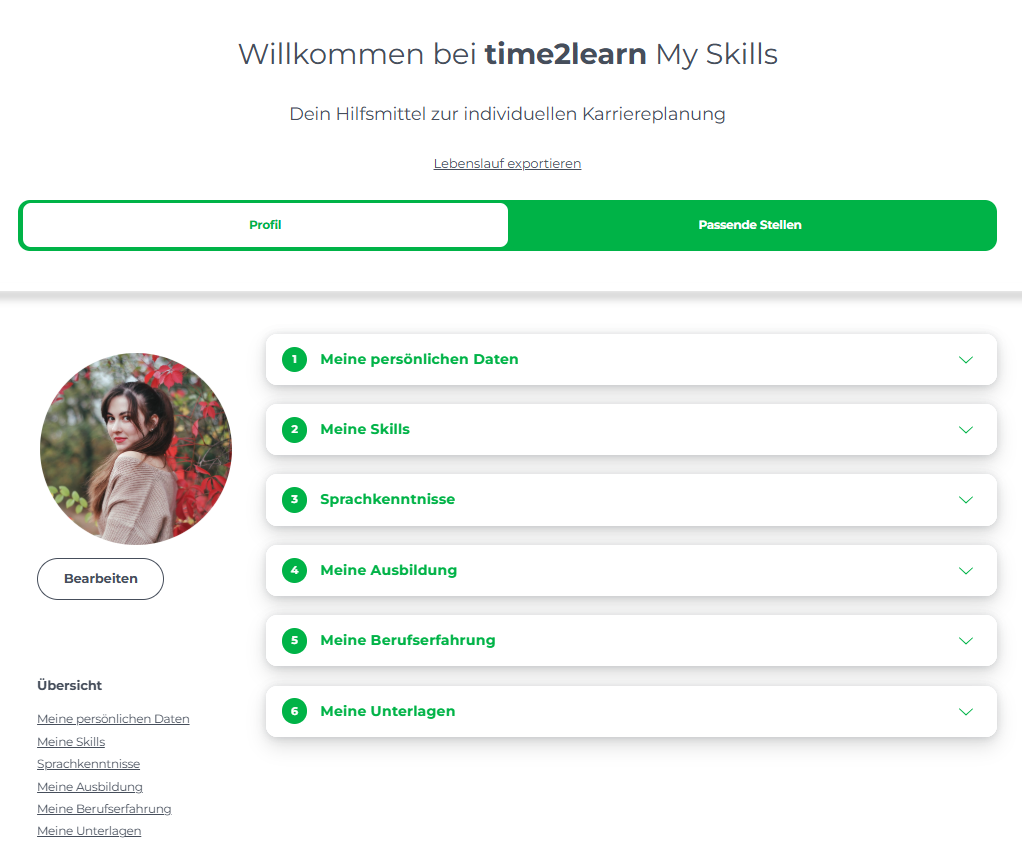
<table border="1" id="bkmrk-%C2%A0-wenn-die-anmeldung" style="border-collapse: collapse; width: 100%; height: 63.3097px; border-width: 1px; background-color: rgb(255, 255, 255); border-color: rgb(255, 255, 255);"><colgroup><col style="width: 69.2208%;"></col><col style="width: 30.8875%;"></col></colgroup><tbody><tr style="height: 63.3097px;"><td style="height: 63.3097px; border-color: rgb(255, 255, 255);">Wenn die Anmeldung erfolgreich war, folgt eine Übersicht deiner persönlichen Daten, Skills, Sprachkenntnisse, Ausbildung, Berufserfahrung und deiner Unterlagen.

</td><td style="height: 63.3097px; border-color: rgb(255, 255, 255);">[![image.png](https://docs.swisslearninghub.help/uploads/images/gallery/2026-01/scaled-1680-/gvmVaCwJFcyusVsn-image.png)](https://docs.swisslearninghub.help/uploads/images/gallery/2026-01/gvmVaCwJFcyusVsn-image.png)

</td></tr></tbody></table>


---

##### 1.1 Deine Persönlichen Daten

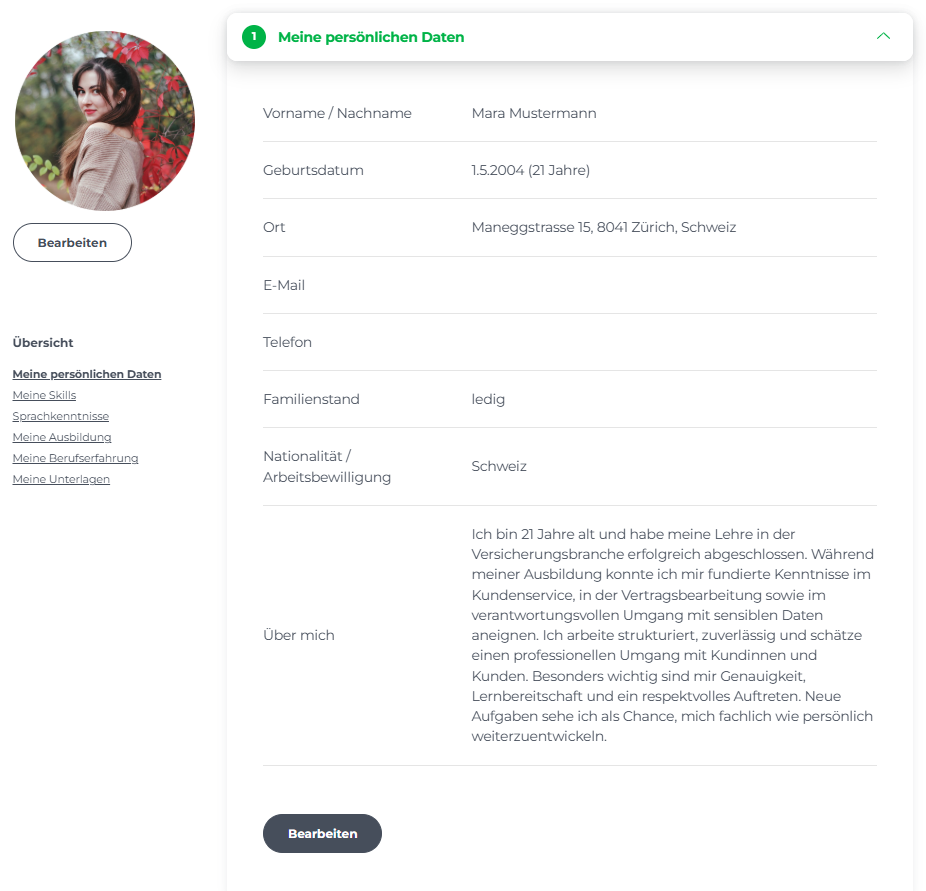
<table border="1" id="bkmrk-%C2%A0-deine-angaben-kann" style="border-collapse: collapse; width: 100%; border-width: 1px; background-color: rgb(255, 255, 255); border-color: rgb(255, 255, 255);"><colgroup><col style="width: 71.9589%;"></col><col style="width: 28.1494%;"></col></colgroup><tbody><tr><td style="border-color: rgb(255, 255, 255);">Deine Angaben kannst du jederzeit mit dem Button **"Bearbeiten"** auf den aktuellsten Stand bringen.

</td><td style="border-color: rgb(255, 255, 255);">[![image.png](https://docs.swisslearninghub.help/uploads/images/gallery/2026-01/scaled-1680-/41I5c2CZDOAhbSCu-image.png)](https://docs.swisslearninghub.help/uploads/images/gallery/2026-01/41I5c2CZDOAhbSCu-image.png)

</td></tr></tbody></table>

---

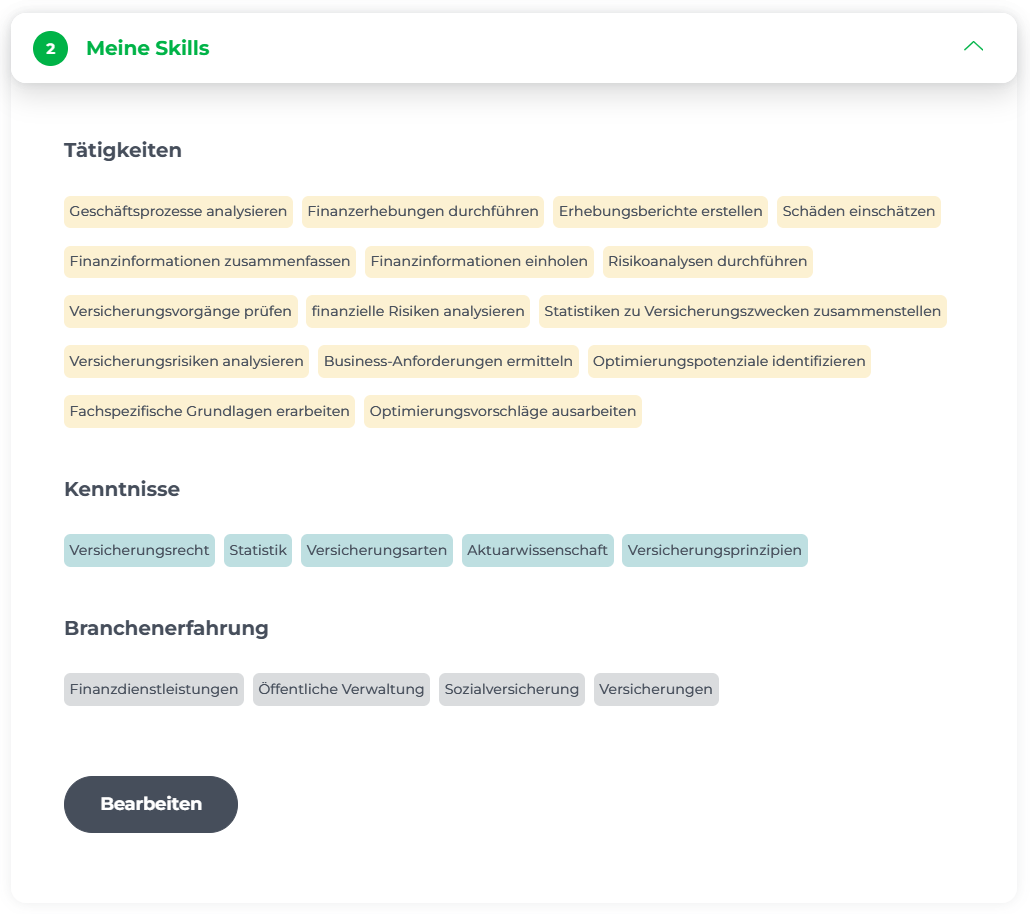
<span style="color: rgb(34, 34, 34); font-family: -apple-system, BlinkMacSystemFont, 'Segoe UI', Oxygen, Ubuntu, Roboto, Cantarell, 'Fira Sans', 'Droid Sans', 'Helvetica Neue', sans-serif; font-size: 1.4em; font-weight: 400;">1.2 Deine Skills</span>

<table border="1" id="bkmrk-%C2%A0-in-diesem-abschnit" style="border-collapse: collapse; width: 100%; border-width: 1px; background-color: rgb(255, 255, 255); border-color: rgb(255, 255, 255);"><colgroup><col style="width: 76.9899%;"></col><col style="width: 22.9993%;"></col></colgroup><tbody><tr><td style="border-color: rgb(255, 255, 255);">In diesem Abschnitt sind alle Tätigkeiten, Kenntnisse und Branchenerfahrungen gesammelt. Die Liste kann jederzeit mit dem Button "Bearbeiten" überarbeitet werden.

</td><td style="border-color: rgb(255, 255, 255);">[![image.png](https://docs.swisslearninghub.help/uploads/images/gallery/2026-01/scaled-1680-/xX1gt5yxPnjMVMBJ-image.png)](https://docs.swisslearninghub.help/uploads/images/gallery/2026-01/xX1gt5yxPnjMVMBJ-image.png)

</td></tr></tbody></table>

---

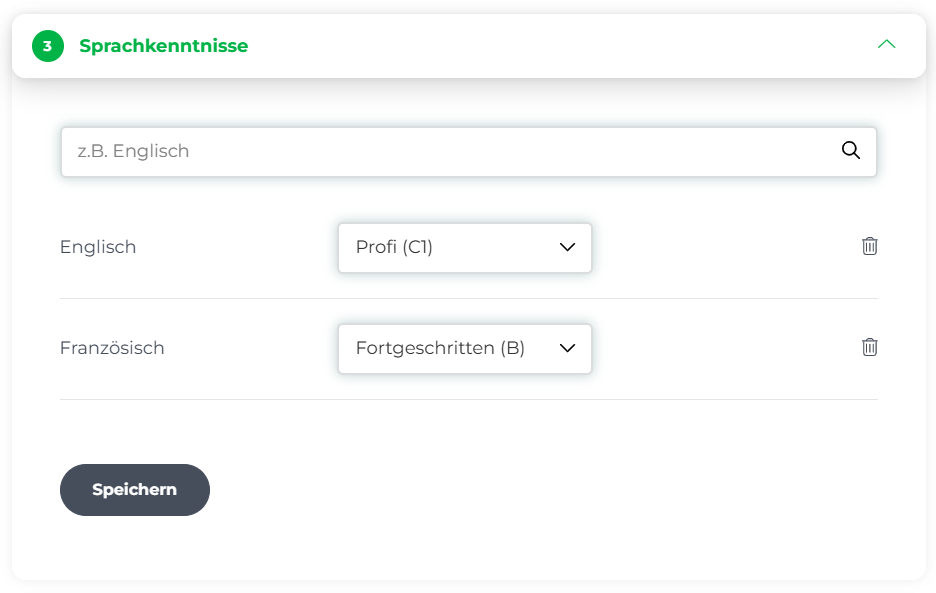
##### 1.3 Meine Sprachkenntnisse

<table border="1" id="bkmrk--3" style="border-collapse: collapse; width: 100%; border-width: 1px; background-color: rgb(255, 255, 255); border-color: rgb(255, 255, 255);"><colgroup><col style="width: 72.3161%;"></col><col style="width: 27.7923%;"></col></colgroup><tbody><tr><td style="border-color: rgb(255, 255, 255);">Hier kannst du angeben, welche Sprachen du auf welchem Niveau kannst.</td><td style="border-color: rgb(255, 255, 255);">[![image.png](https://docs.swisslearninghub.help/uploads/images/gallery/2026-01/scaled-1680-/jiVjMwgzA3LhuEER-image.png)](https://docs.swisslearninghub.help/uploads/images/gallery/2026-01/jiVjMwgzA3LhuEER-image.png)

</td></tr></tbody></table>

---

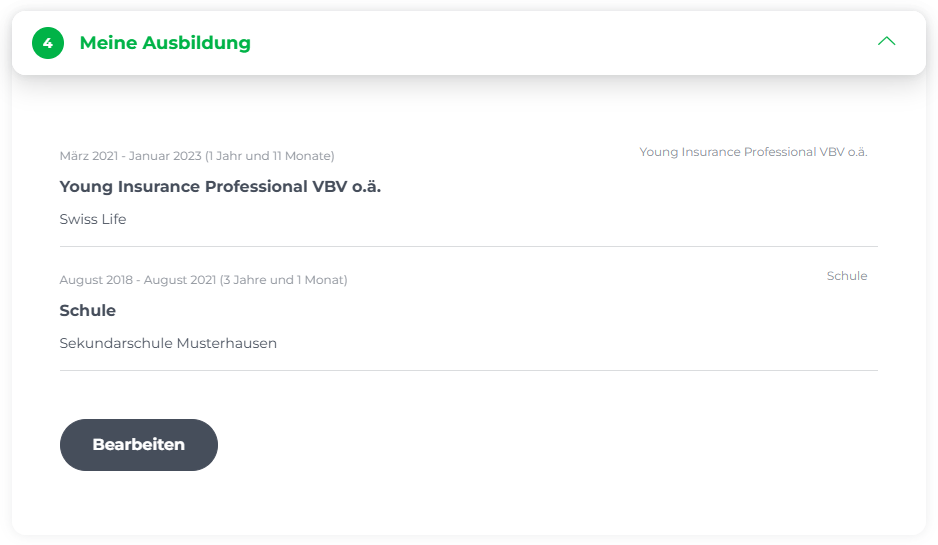
##### 1.4 Deine Ausbildung

<table border="1" id="bkmrk-unter-diesem-abschni" style="border-collapse: collapse; width: 100%; border-width: 1px; background-color: rgb(255, 255, 255); border-color: rgb(255, 255, 255);"><colgroup><col style="width: 74.8446%;"></col><col style="width: 25.1446%;"></col></colgroup><tbody><tr><td style="border-color: rgb(255, 255, 255);">Unter diesem Abschnitt können Bildungsabschlüsse, von Kindergarten bis Militärabschluss, bearbeitet und neu erfasst werden. </td><td style="border-color: rgb(255, 255, 255);">[![image.png](https://docs.swisslearninghub.help/uploads/images/gallery/2026-01/scaled-1680-/ONC8Lsj9A3QC5UmX-image.png)](https://docs.swisslearninghub.help/uploads/images/gallery/2026-01/ONC8Lsj9A3QC5UmX-image.png)

</td></tr></tbody></table>

---

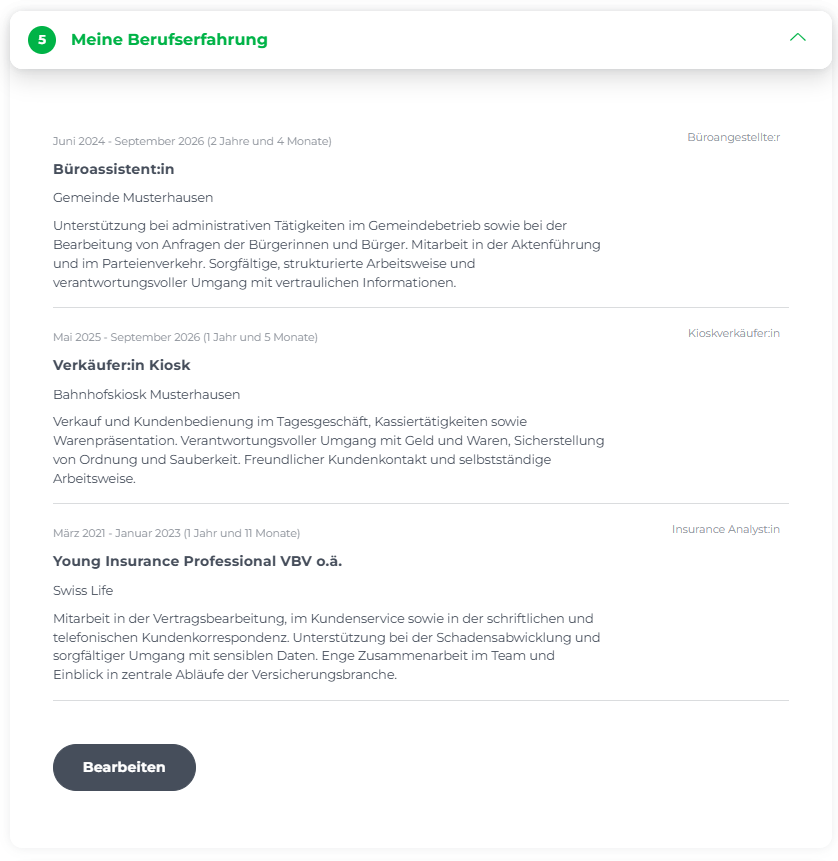
##### 1.5 Deine Berufserfahrung

<table border="1" id="bkmrk-hier-werden-deine-be" style="border-collapse: collapse; width: 100%; border-width: 1px; background-color: rgb(255, 255, 255); border-color: rgb(255, 255, 255);"><colgroup><col style="width: 75.7685%;"></col><col style="width: 24.3399%;"></col></colgroup><tbody><tr><td style="border-color: rgb(255, 255, 255);">Hier werden deine Berufserfahrungen gesammelt. Diese können jederzeit bearbeitet werden. </td><td style="border-color: rgb(255, 255, 255);">[![image.png](https://docs.swisslearninghub.help/uploads/images/gallery/2026-01/scaled-1680-/9vahl7FJJxfmHbYZ-image.png)](https://docs.swisslearninghub.help/uploads/images/gallery/2026-01/9vahl7FJJxfmHbYZ-image.png)

</td></tr></tbody></table>

---


##### 1.6 Deine Unterlagen

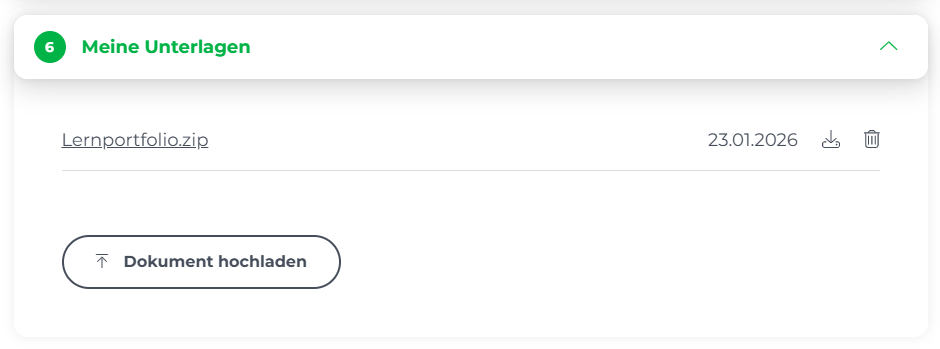
<table border="1" id="bkmrk-alle-unterlagen-die-" style="border-collapse: collapse; width: 100%; border-width: 1px; background-color: rgb(255, 255, 255); border-color: rgb(255, 255, 255);"><colgroup><col style="width: 68.2685%;"></col><col style="width: 31.8399%;"></col></colgroup><tbody><tr><td style="border-color: rgb(255, 255, 255);">Alle Unterlagen die während der Lehrzeit gesammelt und hochgeladen wurden, sind hier gespeichert und abrufbar. Deine exportierten Dokumente werden in einem .zip Format bereitgestellt. Es können jederzeit weitere Dokumente hinterlegt werden. </td><td style="border-color: rgb(255, 255, 255);">[![image.png](https://docs.swisslearninghub.help/uploads/images/gallery/2026-01/scaled-1680-/KFK8vVpNQ6wEwN0f-image.png)](https://docs.swisslearninghub.help/uploads/images/gallery/2026-01/KFK8vVpNQ6wEwN0f-image.png)

</td></tr></tbody></table>

---


#### 2. Der CV-Editor

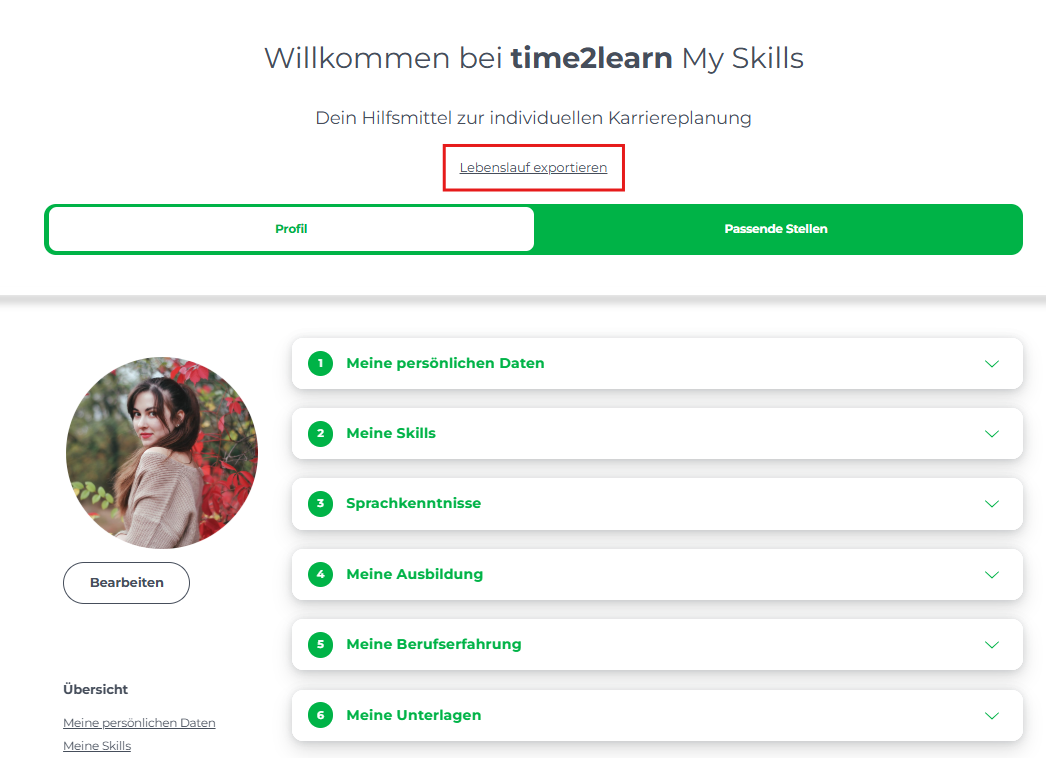
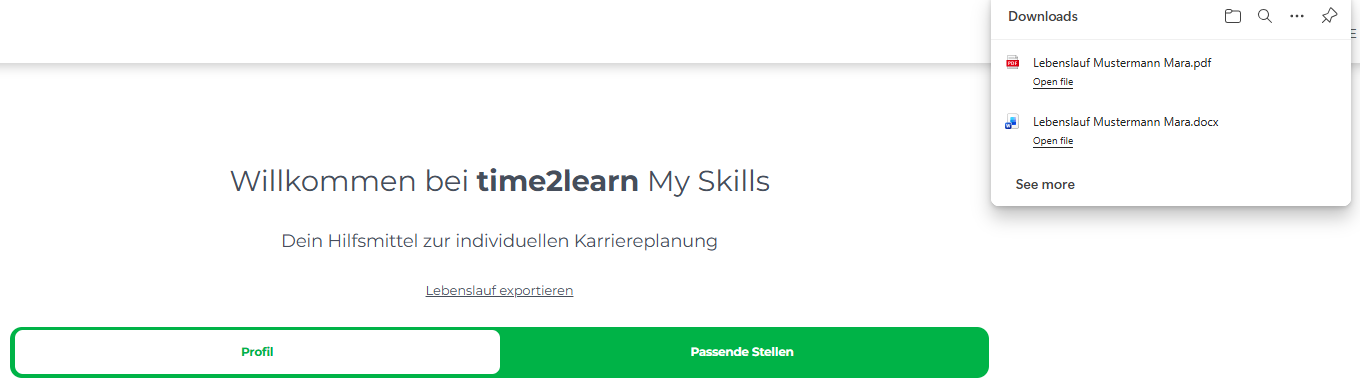
<table border="1" id="bkmrk-mit-dem-cv-editor-ha" style="border-collapse: collapse; width: 100%; height: 268.5px; border-width: 1px; background-color: rgb(255, 255, 255); border-color: rgb(255, 255, 255);"><colgroup><col style="width: 67.9113%;"></col><col style="width: 32.197%;"></col></colgroup><tbody><tr style="height: 268.5px;"><td style="height: 268.5px; border-color: rgb(255, 255, 255);">Mit dem CV-Editor hast du die Möglichkeit, einen Lebenslauf basierend auf deinen persönlichen Angaben, deiner Berufserfahrung, deinen Skills etc. in Form eines im Nachhinein bearbeitbaren Word-Dokuments oder direkt als PDF generieren zu Lassen.</td><td style="height: 268.5px; border-color: rgb(255, 255, 255);">[![image.png](https://docs.swisslearninghub.help/uploads/images/gallery/2026-01/scaled-1680-/vR1Pu9BdNZilyL2z-image.png)](https://docs.swisslearninghub.help/uploads/images/gallery/2026-01/vR1Pu9BdNZilyL2z-image.png)

[![image.png](https://docs.swisslearninghub.help/uploads/images/gallery/2026-01/scaled-1680-/7o0vSrH7j7GrLYqu-image.png)](https://docs.swisslearninghub.help/uploads/images/gallery/2026-01/7o0vSrH7j7GrLYqu-image.png)
</td></tr></tbody></table>

---

#### 3. Jobangebote in time2learn My Skills

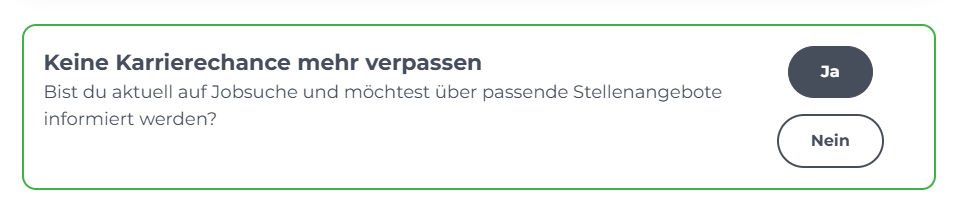
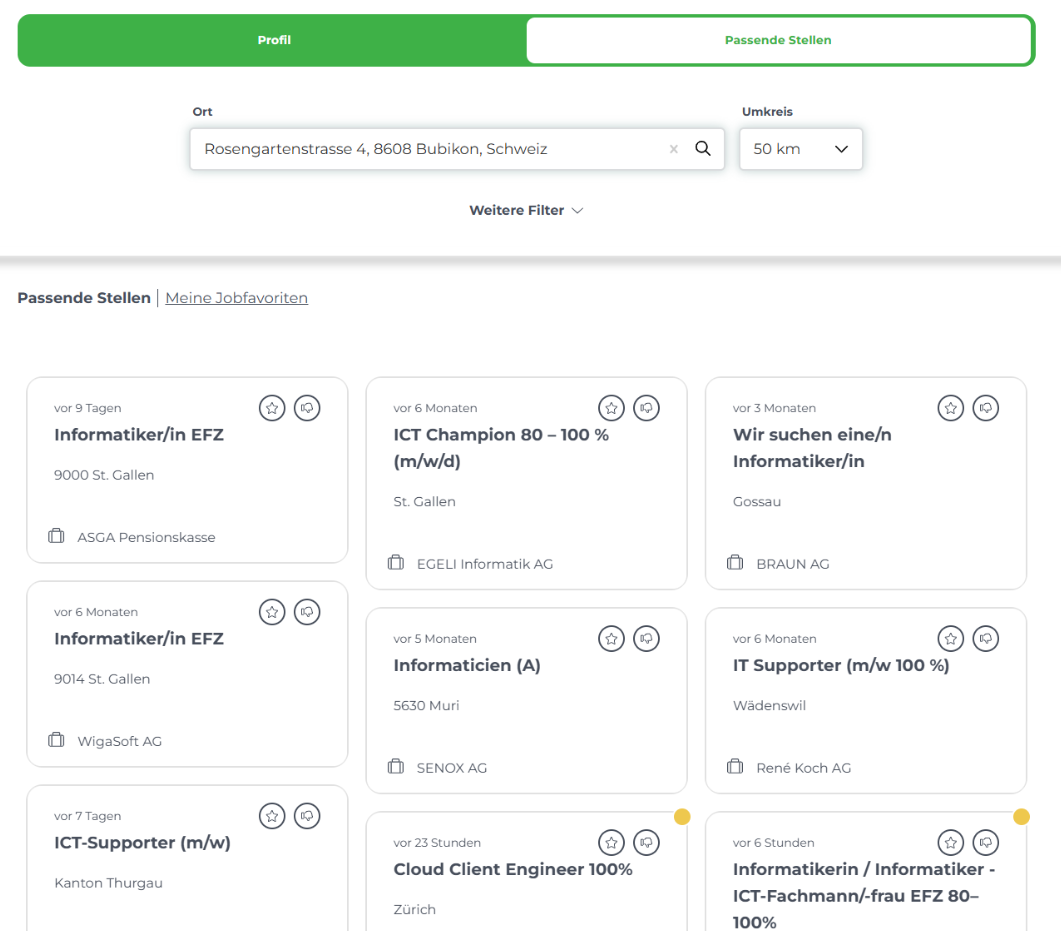
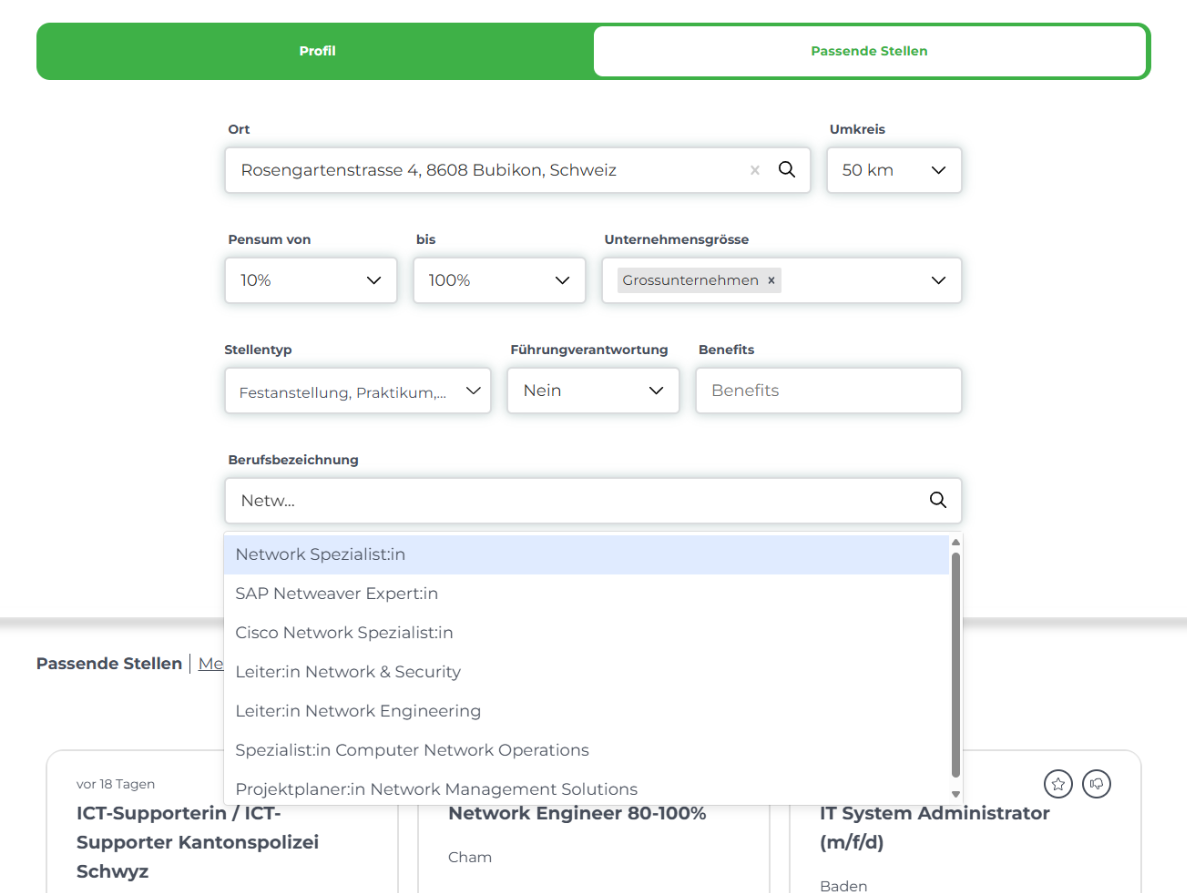
<table border="1" id="bkmrk-auch-bei-der-jobsuch" style="border-collapse: collapse; width: 100%; border-width: 1px; background-color: rgb(255, 255, 255); border-color: rgb(255, 255, 255);"><colgroup><col style="width: 73.0485%;"></col><col style="width: 26.9406%;"></col></colgroup><tbody><tr><td style="border-color: rgb(255, 255, 255);">Auch bei der Jobsuche ist **time2learn My Skills** hilfreich. Du kannst selbst entscheiden, ob du über auf dich zugeschnittene Jobangebote informiert werden möchtest, indem du entweder **"Ja"** oder **"Nein"** anwählst. Wenn <span class="TextRun SCXW78143958 BCX8" data-contrast="auto" lang="DE-CH" xml:lang="DE-CH"><span class="NormalTextRun SCXW78143958 BCX8">das informieren über offene Stellen gewünscht ist, </span><span class="NormalTextRun SCXW78143958 BCX8">werden </span><span class="NormalTextRun SCXW78143958 BCX8">deine Skills </span><span class="NormalTextRun SCXW78143958 BCX8">mittels Künstlicher Intelligenz mit </span><span class="NormalTextRun SCXW78143958 BCX8">offenen Stellen</span><span class="NormalTextRun SCXW78143958 BCX8"> gematcht und passende Jobangebote angezeigt. Sobald eines der Stellenangebote angeklickt wird, wirst du zum Angebot weitergeleitet.</span></span></td><td style="border-color: rgb(255, 255, 255);">[![Screenshot 2025-08-26 142408.png](https://docs.swisslearninghub.help/uploads/images/gallery/2025-08/scaled-1680-/MxsMpPOdmRmviWM5-screenshot-2025-08-26-142408.png)](https://docs.swisslearninghub.help/uploads/images/gallery/2025-08/MxsMpPOdmRmviWM5-screenshot-2025-08-26-142408.png)</td></tr><tr><td style="border-color: rgb(255, 255, 255);"><span class="TextRun SCXW78143958 BCX8" data-contrast="auto" lang="DE-CH" xml:lang="DE-CH"><span class="NormalTextRun SCXW78143958 BCX8">Bei jedem der Stellenangebote ist zu sehen, wann diese erstellt wurden. Kürzlich ausgeschriebene Stellenangebote werden mit einem gelben Punkt gekennzeichnet. </span></span></td><td style="border-color: rgb(255, 255, 255);">[![image.png](https://docs.swisslearninghub.help/uploads/images/gallery/2026-01/scaled-1680-/BOytmPpCY1TkeM2s-image.png)](https://docs.swisslearninghub.help/uploads/images/gallery/2026-01/BOytmPpCY1TkeM2s-image.png)

</td></tr></tbody></table>


---

##### 3.1 Jobangebote Filtern

<table border="1" id="bkmrk-zus%C3%A4tzlich-zum-indiv" style="border-collapse: collapse; width: 100%; border-width: 1px; background-color: rgb(255, 255, 255); border-color: rgb(255, 255, 255);"><colgroup><col style="width: 73.3875%;"></col><col style="width: 26.7208%;"></col></colgroup><tbody><tr><td style="border-color: rgb(255, 255, 255);">Zusätzlich zum individualisierten Angebot, kann die Auswahl der Stellenangebote zudem auch nach individuellen Präferenzen und Kompetenzen gefiltert werden.</td><td style="border-color: rgb(255, 255, 255);">[![image.png](https://docs.swisslearninghub.help/uploads/images/gallery/2026-01/scaled-1680-/zbgrGvphfX9Rujii-image.png)](https://docs.swisslearninghub.help/uploads/images/gallery/2026-01/zbgrGvphfX9Rujii-image.png)

</td></tr></tbody></table>

---

##### 3.2 Jobangebote kategorisieren

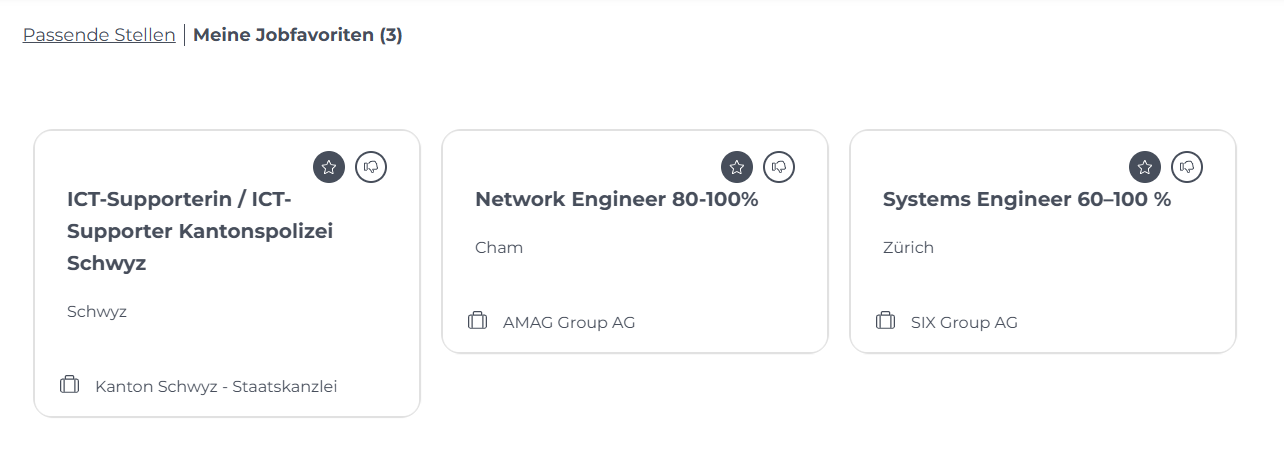
<table border="1" id="bkmrk-falls-dir-ein-spezif" style="border-collapse: collapse; width: 100%; border-width: 1px; background-color: rgb(255, 255, 255); border-color: rgb(255, 255, 255);"><colgroup><col style="width: 73.5066%;"></col><col style="width: 26.6018%;"></col></colgroup><tbody><tr><td style="border-color: rgb(255, 255, 255);">Falls dir ein spezifisches Stellenangebot besonders angetan hat und du nochmal darauf zurückkommen möchtest, kannst du dieses mit einem Stern markieren. Es wird dann unter **"Meine Jobfavoriten"** aufgelistet.

Für den Fall, dass dir einzelne Stellenangebote als unpassend erscheinen, kannst du diese mit dem "Daumen nach unten Zeichen" markieren, welcher sich gleich neben dem Stern-Symbol befindet. Dieses Angebot verschwindet anschliessend aus der Liste.

</td><td style="border-color: rgb(255, 255, 255);">[![Screenshot 2025-08-26 143103.png](https://docs.swisslearninghub.help/uploads/images/gallery/2025-08/scaled-1680-/uWKVpphu9LQ2sVjn-screenshot-2025-08-26-143103.png)](https://docs.swisslearninghub.help/uploads/images/gallery/2025-08/uWKVpphu9LQ2sVjn-screenshot-2025-08-26-143103.png)</td></tr></tbody></table>

# 6. Passwort ändern/zurücksetzen

<table border="1" id="bkmrk-%C2%A0-sollte-ein-passwor" style="font-family: -apple-system, BlinkMacSystemFont, 'Segoe UI', Oxygen, Ubuntu, Roboto, Cantarell, 'Fira Sans', 'Droid Sans', 'Helvetica Neue', sans-serif; font-size: 14px; width: 100%; border-collapse: collapse; border-width: 1px; background-color: rgb(255, 255, 255); border-color: rgb(255, 255, 255);"><colgroup><col style="width: 79.9351%;"></col><col style="width: 20.1732%;"></col></colgroup><tbody><tr><td style="border-color: rgb(255, 255, 255);">Sollte ein Passwort vergessen werden oder wird aus Sicherheitsgründen ein Neues gewünscht, kannst dieses bei der Anmeldung bei **time2learn My Skills** mit dem Klick auf den Link **"Passwort vergessen"** zurückgesetzt und ein Neues festgelegt werden.

</td><td style="border-color: rgb(255, 255, 255);">[![image.png](https://docs.swisslearninghub.help/uploads/images/gallery/2025-08/scaled-1680-/Daf2HLadylkLfdHH-image.png)](https://docs.swisslearninghub.help/uploads/images/gallery/2025-08/Daf2HLadylkLfdHH-image.png)</td></tr></tbody></table>

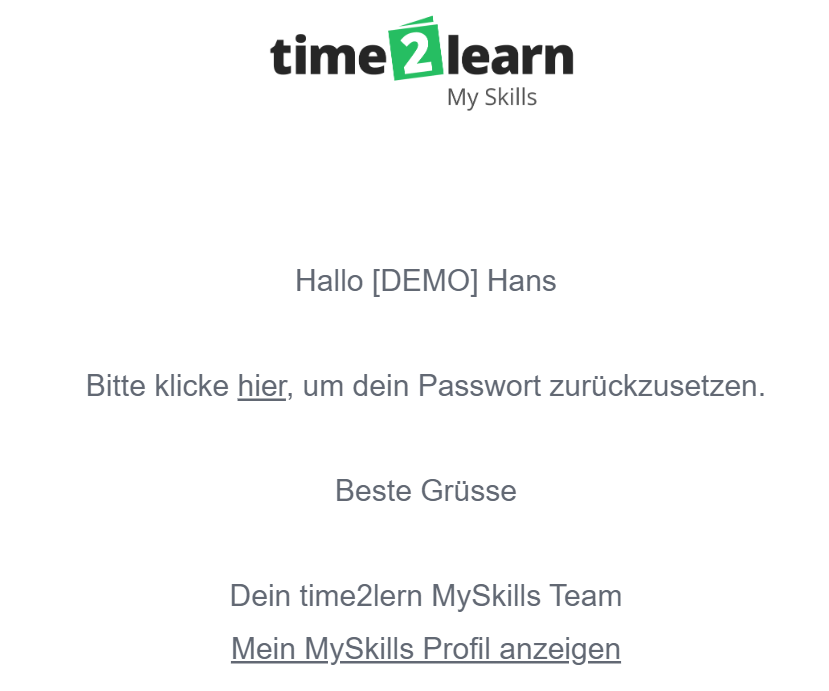
<table border="1" id="bkmrk-%C2%A0-anschliessend-gibs" style="font-family: -apple-system, BlinkMacSystemFont, 'Segoe UI', Oxygen, Ubuntu, Roboto, Cantarell, 'Fira Sans', 'Droid Sans', 'Helvetica Neue', sans-serif; font-size: 14px; width: 100%; border-collapse: collapse; border-width: 1px; background-color: rgb(255, 255, 255); border-color: rgb(255, 255, 255);"><colgroup><col style="width: 79.8161%;"></col><col style="width: 20.2923%;"></col></colgroup><tbody><tr><td style="border-color: rgb(255, 255, 255);">Anschliessend gibst du im Feld deine E-Mail-Adresse ein. In kürze sollte dir dann eine E-Mail in deinem Postfach erscheinen, mit welcher du ein neues Passwort setzen kannst.

</td><td style="border-color: rgb(255, 255, 255);">[![image.png](https://docs.swisslearninghub.help/uploads/images/gallery/2025-08/scaled-1680-/GwUMXhn3ZxwZTksI-image.png)](https://docs.swisslearninghub.help/uploads/images/gallery/2025-08/GwUMXhn3ZxwZTksI-image.png)</td></tr></tbody></table>

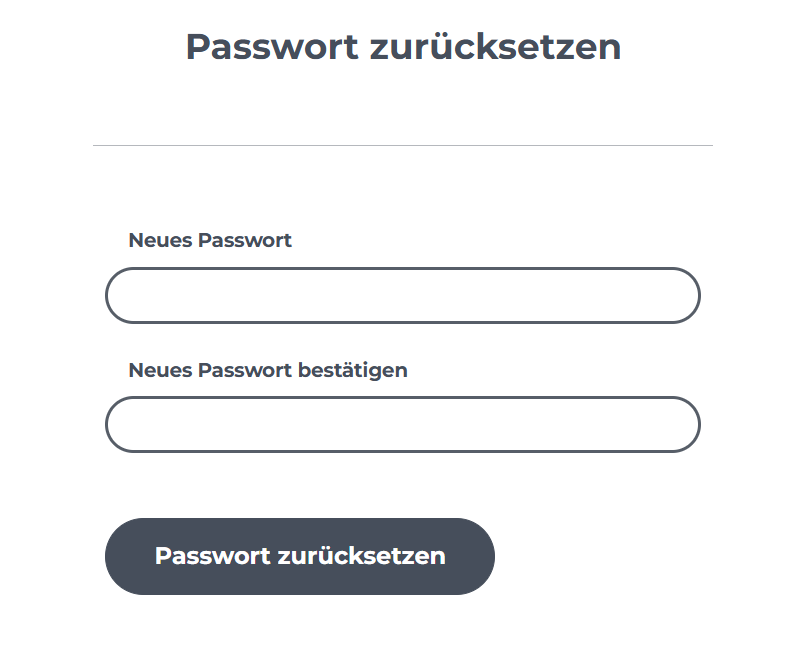
<table border="1" id="bkmrk-%C2%A0-als-n%C3%A4chstes%2C-kann" style="border-collapse: collapse; width: 100%; border-width: 1px; background-color: rgb(255, 255, 255); border-color: rgb(255, 255, 255);"><colgroup><col style="width: 78.6256%;"></col><col style="width: 21.4827%;"></col></colgroup><tbody><tr><td style="border-color: rgb(255, 255, 255);">Als nächstes, kannst du dein neues Passwort eingeben und dich dann in deinem time2learn My Skills wie üblich anmelden.

</td><td style="border-color: rgb(255, 255, 255);">[![image.png](https://docs.swisslearninghub.help/uploads/images/gallery/2025-08/scaled-1680-/KgBGuqvtihH6Bg7k-image.png)](https://docs.swisslearninghub.help/uploads/images/gallery/2025-08/KgBGuqvtihH6Bg7k-image.png)</td></tr></tbody></table>